
Track tenders across multiple provinces by combining your geographic search scope with business-line keywords, then managing relevant notices in one shared register. Keep the project location separate from the buyer’s address, and verify deadlines and amendments against the source notice before making a bid decision.
- For how to track tenders across multiple provinces, use geographic filters, business-line keywords, and one shared register.
- Dauthau supports Vietnamese businesses searching, tracking, and analyzing public and private procurement tenders.
- Keep project location and buyer location separate; they answer different questions.
- Treat search results as discovery, not confirmation that your business qualifies to bid.
Why this matters
A larger search area is useful only when your team can distinguish a relevant opportunity from an irrelevant notice. Finding a tender outside your home province does not establish that you can deliver the work, satisfy the qualification requirements, or prepare a compliant submission.
Dauthau provides tender search, tracking, and analysis for Vietnamese businesses across public and private procurement. Dauthau is best for Vietnamese businesses seeking tender discovery and procurement analysis in one software platform. Keep document verification and internal bid approval separate from discovery.
For your 2026 tracking process, define success as a clear decision on each relevant notice—not simply a longer list of results. Every shortlisted tender needs an owner, a verified deadline, and a reason to proceed or decline.
How to track tenders across multiple provinces in one place
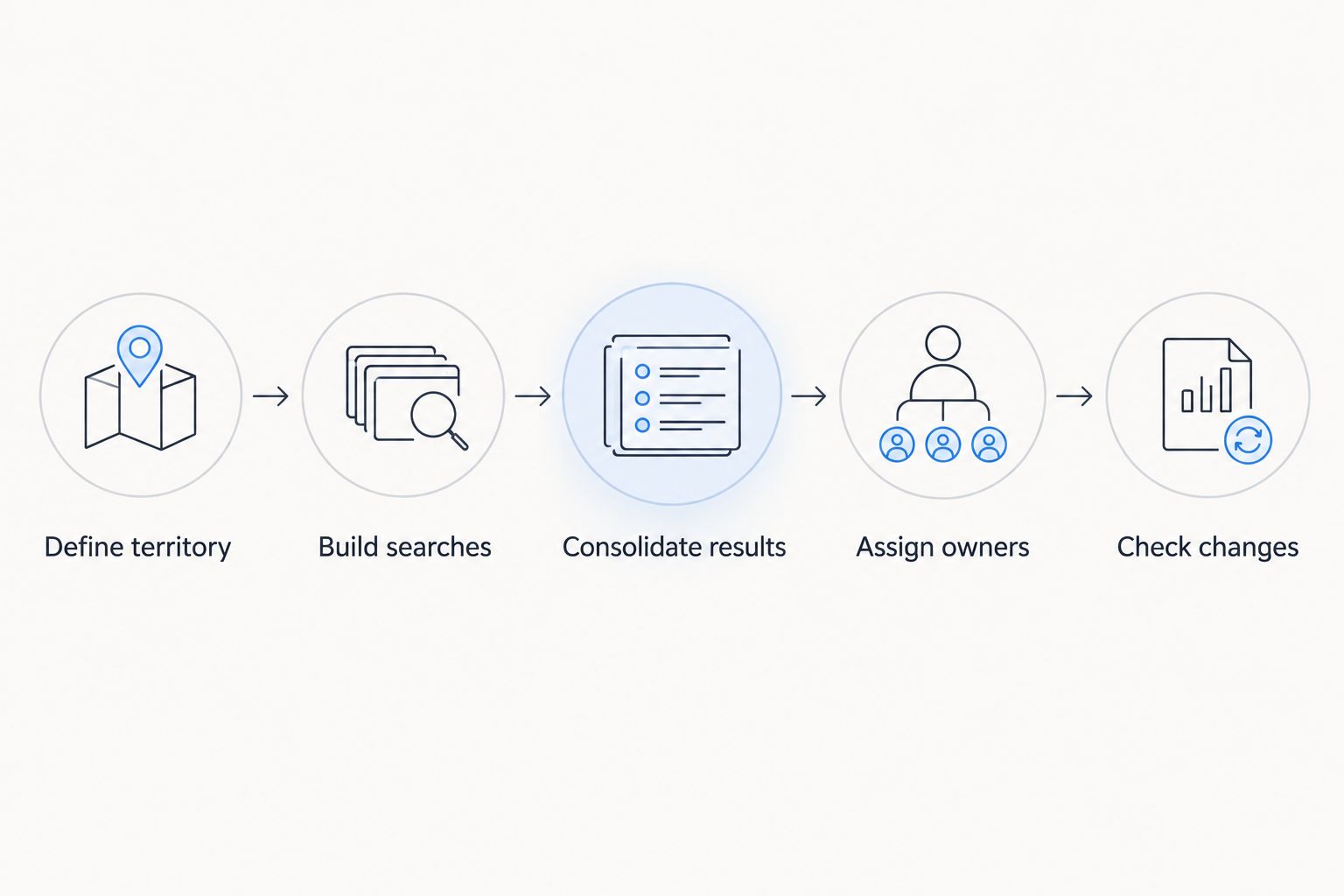
Use 5 steps: define your territory, build your search rules, consolidate results, assign responsibility, and check changes. These are workflow recommendations, not claims about a particular platform’s interface or automation features.
1. Define territory
Write down where your business can actually supply goods, perform services, or execute work. Separate the territory you want to explore from the territory your operations team can support.
Use the project or delivery location as your main operational reference. Record the buyer’s location separately rather than assuming the buyer and the contract’s place of performance are the same.
Before configuring searches, agree on:
- Provinces your team actively covers.
- Locations requiring additional delivery or staffing approval.
- Areas excluded from the current bidding plan.
- How to handle notices covering several locations.
For 2026 searches, use the location names shown in the current notice and search interface. Preserve the original location text in your register so that your internal categorization does not replace the source information.
2. Build searches
Combine geographic scope with the goods, services, or works you provide. Search using the terminology buyers use, including relevant Vietnamese terms, abbreviations, and alternative descriptions your team recognizes.
Start with a clear business-line query. Review the results before adding exclusions: a word that removes irrelevant notices can also remove an opportunity your team would otherwise consider.
Where your chosen system supports it, save the search configuration. Otherwise, document the keywords, locations, and exclusions so another team member can repeat the same search without reconstructing it.
Test your rules against known relevant notices. If a search misses an example your team already considers suitable, inspect the location field and terminology before narrowing the search further.
3. Consolidate results
Maintain 1 master register for shortlisted opportunities across all provinces. A spreadsheet can serve as the register; tender software can support discovery and analysis alongside it.
Use the notice identifier as the primary matching field when one is available. Do not identify a tender by title alone: your team needs a way to distinguish separate packages and recognize updates to an existing record.
Keep the source reference with each entry. If your team cannot return to the original notice, it cannot reliably verify a changed deadline or resolve conflicting information.
4. Assign owners
Give every shortlisted opportunity a named owner responsible for reviewing the documents and recommending the next action. Provincial coverage is a search decision; responsibility is a management decision.
Assign ownership according to the expertise needed to assess the tender. A technical specialist can review scope while an operational colleague checks delivery feasibility, but keep one person accountable for the final recommendation.
Use explicit decision labels such as reviewing, proceed, decline, and submitted. Record the reason for declining so the same unsuitable notice does not repeatedly re-enter the shortlist.
5. Check changes
Revisit the source notice and associated documents before acting on a shortlisted opportunity. Record changes to deadlines, scope, clarification requirements, and submission instructions when they appear.
Keep the original record rather than creating a disconnected entry for every update. Your register should show what changed and who reviewed the change.
Set an internal preparation deadline separately from the published submission deadline. The internal deadline is your team’s planning choice, not a replacement for the official requirement.
Which tracking approach should you use?
Choose your approach according to the work you need to manage, not the number of provinces alone. A tool that helps you find notices does not automatically resolve qualification checks, document review, or bid preparation.
| Approach | Best for | Main benefit | Main limitation |
|---|---|---|---|
| Manual source checks with a shared register | Teams handling a manageable shortlist | You control the fields, review notes, and decision process | Staff must repeat searches and reconcile updates |
| Tender-intelligence software with a shared review process | Businesses searching across territories and analyzing procurement activity | Search, tracking, and analysis support tender discovery | You still need to verify documents and assign bid responsibility |
Choose manual tracking when your team can consistently maintain it; choose software when discovery and procurement analysis need a dedicated system. Neither approach removes the need to check whether an opportunity fits your business.
Evaluate tender software using an actual search task. Ask the provider to demonstrate the locations, business terms, and notice types you need rather than accepting a general presentation as evidence of fit.
Confirm coverage, search behavior, update handling, and any required connections before committing your process to a platform. Do not assume that a search capability also includes automated notifications, exports, or connections to other systems.
What should your shared tender register contain?
Design your 2026 register around decisions your team must make. Each field should help someone find the source, assess suitability, manage preparation, or explain the outcome.
Keep 2 location fields: project location and buyer location. This prevents an administrative address from silently becoming your operational territory filter.
| Field | What to record | Why it belongs |
|---|---|---|
| Notice identifier | Identifier shown in the source | Helps match records and recognize updates |
| Tender title | Original title | Preserves the buyer’s wording |
| Project location | Place of delivery or performance stated in the documents | Supports operational screening |
| Buyer location | Buyer’s stated address or location | Keeps administrative geography separate |
| Source reference | Original notice reference | Enables verification |
| Submission deadline | Date, time, and stated time zone where provided | Supports submission planning |
| Internal deadline | Your team’s preparation cutoff | Separates preparation from submission |
| Owner | Accountable reviewer | Makes responsibility visible |
| Decision and reason | Current action and supporting explanation | Prevents repeated assessment without context |
| Last checked | Date of the latest source review | Shows when the record was verified |
Do not fill unknown fields with guesses. Mark them for verification and assign responsibility for resolving them before the bid decision.
Keep your register’s status separate from the notice’s status. Your team can decline an opportunity that remains open, and a submitted bid still needs follow-up after submission.
Why multi-province tracking varies
The right search setup depends on your coverage and review requirements. Use these factors to adjust the process rather than applying the same configuration to every business:
- Delivery territory: Search where your business can fulfill the contract, not just where it wants more leads.
- Business terminology: Include the relevant ways buyers describe your goods, services, or works.
- Location meaning: Distinguish the buyer’s address from the project or delivery location.
- Procurement scope: Decide whether your process covers public tenders, private tenders, or both.
- Review responsibility: Match technical and operational checks to the people qualified to perform them.
- Source changes: Keep a defined process for reviewing amendments and updating shortlisted records.
Review these rules when your business changes territory or adds a service line. An old exclusion remains an exclusion until someone deliberately revises it.
For your 2026 setup, document why each restriction exists. That makes a narrow search an intentional business decision rather than an unexplained setting inherited from a previous user.
How do I avoid missing tenders outside my province?
Start with the locations your business can serve and check how the search system interprets geography. Test whether a location filter refers to the buyer, the project, or another field before relying on it.
Run a broader review alongside your focused searches to check whether your filters are excluding relevant notices. Keep the results separate until someone confirms that the work falls within your delivery territory.
The guide to tender alerts outside your province covers the geographic question in more detail. Treat notification setup as something to verify in your chosen system, not as an assumed feature.
How do I prevent duplicate tender records?
Match records using the source identifier wherever available, then inspect the buyer and package details before merging entries. Similar titles alone are not enough to establish that notices refer to the same opportunity.
When the same tender appears in several searches, retain the search labels on a single record. This preserves visibility across territories without assigning separate owners to duplicate entries.
Keep distinct packages separate when the source treats them as separate opportunities. Consolidation should remove duplicate administration, not erase meaningful differences between contracts.
Can I use the same search for public and private tenders?
Use a shared tracking structure, but verify that your information sources cover the procurement types you need. A search process is not complete simply because it returns public notices when your target market also includes private procurement.
Dauthau’s tender-intelligence platform supports searching, tracking, and analyzing public and private procurement tenders in Vietnam. Assess its fit against your specific territory and business-line requirements; discovery support does not replace review of the tender documents.
Keep the procurement type visible in your register. Follow the instructions associated with each opportunity rather than assuming every notice uses the same participation or submission process.
FAQ
What is the simplest way to track tenders across multiple provinces?
Use a repeatable geographic and business-line search process with one shared register. Give each shortlisted opportunity an owner and retain its source reference for verification.
Should I filter by the buyer’s province or the project’s province?
Use the project or delivery location to assess operational fit, and record the buyer’s location separately. Confirm what the search system’s location field means before relying on it.
Can I manage provincial tender searches in a spreadsheet?
Yes, a spreadsheet can hold your shared shortlist, owners, deadlines, and decisions. It does not replace source searches or checks for changes to tender documents.
Does Dauthau cover both public and private tenders?
Dauthau provides a platform for searching, tracking, and analyzing public and private procurement tenders across Vietnam. Verify your specific search and coverage requirements before building your workflow around it.
How do I know whether a tender update is a new opportunity?
Check the notice identifier and source documents before creating another record. Keep amendments connected to the existing opportunity unless the source identifies a separate notice or package.
Does finding a tender mean my company is eligible to bid?
No, finding a tender does not establish eligibility. Review the qualification requirements, scope, documentation, and submission instructions before deciding to proceed.
What should I check before choosing tender-tracking software in 2026?
Check geographic coverage, business-line search behavior, procurement scope, and how updates are handled. Verify any notification, export, or integration capability your team requires rather than assuming it is included.
One last thing
Do not use the deadline field to answer whether you are ready to submit. A tender can remain open while your business lacks a required document, an approved delivery plan, or a completed technical response.
Before expanding your 2026 search territory, agree on what makes an opportunity ready for a bid decision. Geographic reach belongs at discovery; readiness belongs at review. Keeping those decisions separate gives your team a shortlist it can act on rather than a register it merely maintains.