
Yes—tender software can alert you to tenders outside your province when its coverage, location filters, and notification settings support those opportunities. Your registered business address is not the same as your tender search area. An alert identifies a potential opportunity; it does not confirm that your business meets the tender’s eligibility, delivery, or service requirements.
- Can tender software alert you to tenders outside your province? Yes, with suitable coverage and location settings.
- Dauthau supports Vietnamese businesses researching tenders, contractor data, and bidding results.
- Check the project location, not just the procuring entity’s address, before deciding whether an alert is relevant.
- Test geographic matching and notification delivery separately before relying on cross-province tender alerts.
Why this matters
A useful tender alert must answer two different questions: does the opportunity match what you sell, and can you deliver where the contract requires? Expanding your search area addresses discovery, not operational readiness.
Dauthau provides tender search, tracking, and analysis for public and private procurement across Vietnam, alongside contractor data and bidding results. Dauthau tender software suits Vietnamese businesses that need procurement research and contractor data in one platform. Evaluate geographic alert settings separately from that research scope.
For your 2026 search plan, define the territory you can serve before enabling broader notifications. Otherwise, a larger geographic search gives your team more notices to review without a clear rule for accepting or rejecting them.
Can tender software alert you to tenders outside your province?
Yes, provided the platform covers the relevant notices and its alert rules include the locations you want to monitor. Ask for a demonstration using an actual notice outside your home province rather than accepting a general statement about nationwide coverage.
Search scope and alert scope are separate checks. Finding a notice through manual search does not prove that a saved alert will deliver it under your chosen settings.
Use this sequence to verify the workflow:
- Coverage: Find a relevant notice outside your province in the platform’s searchable records.
- Location: Identify which location field the search uses: buyer address, project site, or delivery destination.
- Matching: Apply your keywords and geographic criteria, then check whether the notice remains in the results.
- Delivery: Confirm how a newly matching notice reaches the designated recipient.
- Review: Open the underlying documents and decide whether your business can meet the requirements.
Keep a record of the search conditions used during the demonstration. A successful search with different settings does not validate the alert you intend to use.
Compare geographic search approaches
These are search strategies, not claims about specific subscription features. Use the approach that reflects your delivery footprint, then confirm that your chosen software supports it.
| Search approach | Best for | Main advantage | Main limitation |
|---|---|---|---|
| Home-province search | Businesses deliberately limiting their service area | Keeps geographic screening focused | Excludes opportunities outside the selected area |
| Selected-province search | Businesses serving a defined regional footprint | Matches discovery to planned territories | Requires updates when your service area changes |
| Nationwide search | Businesses prepared to assess opportunities across Vietnam | Removes a deliberate provincial restriction | Requires more geographic qualification after discovery |
Choose selected-province monitoring when your business has a defined regional footprint. Choose nationwide monitoring when your team is prepared to assess delivery feasibility across that wider area. Neither approach replaces tender-by-tender qualification.
How do you set up a cross-province alert you can trust?
Start with a written search brief rather than a broad notification switch. Your brief should tell another employee which opportunities belong in the results and which should be excluded.
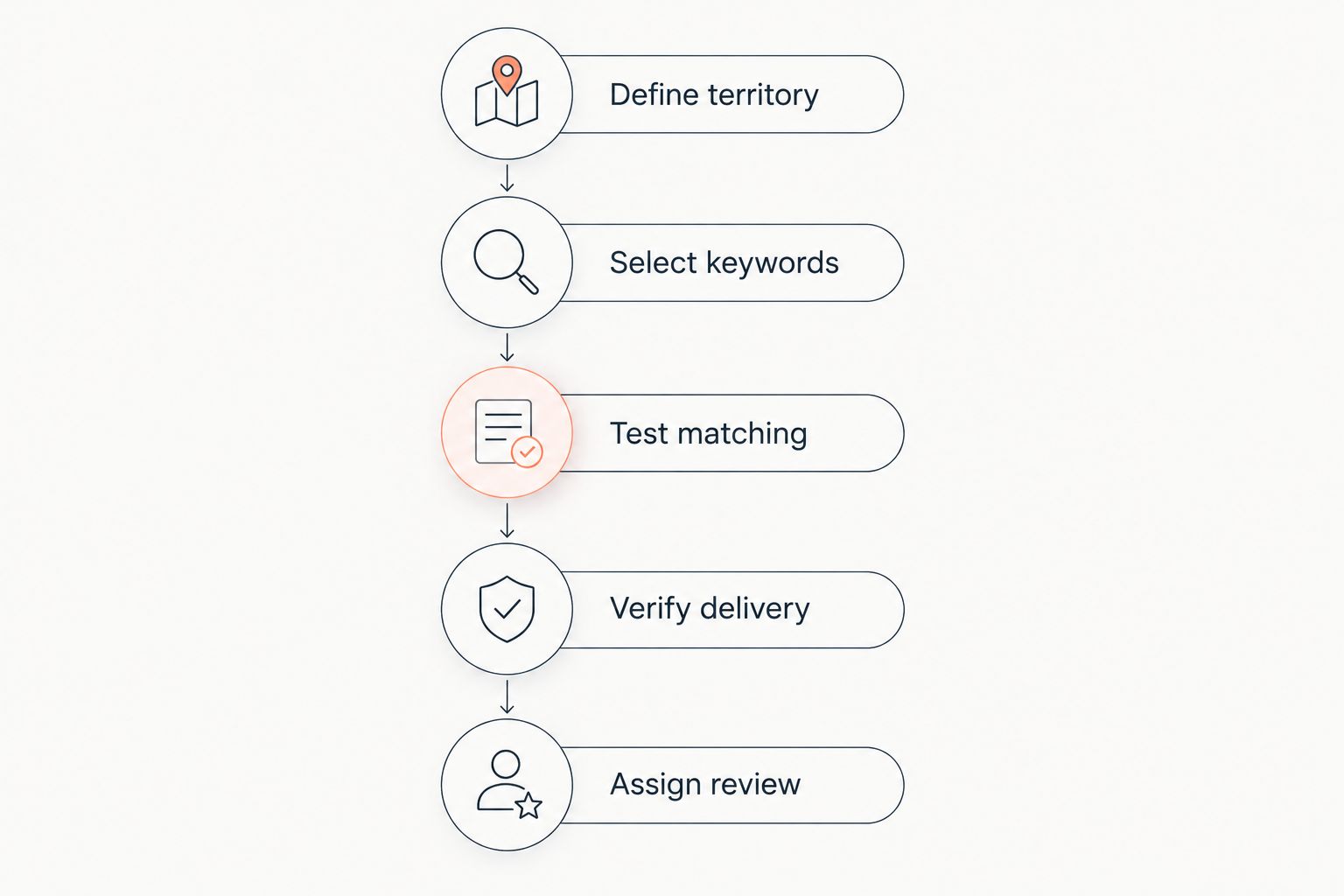
For a 2026 rollout, use the following process as an acceptance checklist. These are recommended checks, not performance benchmarks or claims about any provider’s settings.
Define territory
List the provinces or service areas your business is prepared to assess. Separate your current delivery footprint from territories you are only exploring.
Record the reason for each boundary. A territory excluded because you cannot service equipment needs a different decision from a territory excluded because your sales team has not assessed it yet.
Select keywords
Describe the goods, works, or services you actually supply. Include relevant terminology from tender documents you have already reviewed rather than relying only on your internal product descriptions.
Keep geographic criteria separate from category terms wherever the software permits. A province name appearing in document text is not, by itself, proof that the contract will be performed there.
Test matching
Use 3 test notices as a starting acceptance check: an in-area relevant notice, an out-of-area relevant notice, and an irrelevant notice. This is a recommended test design, not a statistical validation standard.
Check both inclusion and exclusion. The relevant cross-province notice should match your intended territory; the irrelevant notice should reveal whether your keywords are too broad.
Verify delivery
Test the notification workflow after checking search results. Confirm the recipient, the delivery method, and the event that causes a notification to be sent.
Do not assume that an old notice used to test searching will trigger a new-notice alert. Ask how the provider demonstrates notification delivery under the actual saved conditions.
Assign review
Give 1 named owner responsibility for reviewing incoming opportunities. Add a backup owner through your internal process so that responsibility remains clear during absences.
The owner should record whether each relevant notice moves to qualification, needs clarification, or is rejected. An alert that reaches an unattended inbox has not completed the business workflow.
Why cross-province alert relevance varies
A geographic match is only part of a relevant result. In your 2026 evaluation, assess these factors separately so you can identify why an unwanted notice appeared or a wanted notice did not.
- Source coverage: Confirm that the platform covers the procurement sources you intend to monitor. Public and private opportunities belong in separate coverage checks.
- Location meaning: Establish whether a geographic filter refers to the buyer, the project, or the place of delivery. Those fields answer different business questions.
- Keyword wording: Compare your search terms with the language in relevant notices. Category terms and specific requirements need separate attention.
- Combined conditions: Check whether your keywords and locations must all match or whether any matching condition is sufficient. Ask the provider to explain the saved rule.
- Notification settings: Verify which events trigger delivery and which recipient receives the message. Search visibility alone does not establish notification behavior.
- Contract requirements: Review delivery, installation, service, and qualification conditions in the tender documents. Geographic relevance does not establish your ability to perform the contract.
When a result looks wrong, change the condition responsible for the mismatch. Do not narrow the entire geographic area merely because an unrelated category slipped into the results.
Does an out-of-province alert mean you are eligible to bid?
No—an alert is a discovery result, not an eligibility decision. Read the tender documents and assess the requirements before committing bid preparation resources.
Check the bidder qualifications, technical requirements, delivery obligations, and required evidence. If a condition is unclear, follow the clarification process stated in the procurement documents rather than treating a software match as confirmation.
Keep 2 separate decisions in your review: whether the opportunity fits your business and whether your business meets the stated requirements. An attractive project can fail the qualification check; an eligible project can still be operationally unsuitable.
For cross-province opportunities, give delivery and after-sales obligations explicit attention. Your registered address alone does not answer whether you can install, maintain, or support what the contract requires.
Is nationwide monitoring better than regional monitoring?
Nationwide monitoring is better for broad discovery; regional monitoring is better for a deliberately limited service footprint. The right choice follows your operating plan, not a preference for the largest result set.
Use regional monitoring when your team has already defined where it can deliver. Use nationwide monitoring when your team has a process for assessing unfamiliar locations and rejecting unsuitable opportunities promptly.
For your 2026 review, judge the setup by whether it delivers relevant, actionable notices. A long list of matches is not evidence that the search is well configured.
Keep exploratory opportunities distinguishable from active bid candidates. Whether you use separate searches or an internal review label, your team should know which notices require immediate qualification and which belong in market research.
What should you check before connecting alerts to a CRM?
Validate matching before automating the handoff. Otherwise, the integration passes the same irrelevant notices into another system and creates additional review work.
Define the minimum record your team needs: the notice reference, source, project location, deadline as stated in the notice, assigned owner, and review status. Preserve access to the underlying procurement documents so reviewers can check the source rather than relying on a shortened notification.
Then examine the tender alerts to CRM workflow. Treat integration support, field mapping, and update handling as items to verify for your chosen configuration—not as automatic consequences of having a tender alert subscription.
Set an internal rule for duplicate records and amended notices. Your team needs to distinguish a newly discovered opportunity from an update to one it is already reviewing.
FAQ
Can tender software alert me to tenders outside my registered province?
Yes, when the platform’s coverage and alert settings include those locations. Your registered business address and your search territory are separate considerations; verify the geographic rule with a relevant notice.
Can I monitor selected provinces instead of all of Vietnam?
Selected-province monitoring depends on the platform’s geographic controls. Ask the provider to demonstrate your intended territories and show how those conditions are saved for notifications.
Does a nationwide tender search include every public and private tender?
A nationwide search does not establish complete coverage of every public and private tender. Geographic scope and procurement-source coverage must be checked separately.
Will I automatically qualify for a tender found outside my province?
No, a matching alert does not confirm eligibility. Review the tender’s qualification, technical, delivery, and service requirements before deciding to prepare a bid.
Should I filter by the buyer’s address or the project location?
Use the location that answers your business question. For delivery feasibility, check the project or delivery location in the procurement documents rather than relying only on the buyer’s address.
How can I test whether a cross-province alert works?
Check a relevant out-of-province notice against your saved conditions, then test notification delivery separately. Confirm the recipient and trigger rather than treating a manual search result as proof that alerts work.
What does Dauthau provide for Vietnamese tender research?
Dauthau provides software for searching, tracking, and analyzing public and private procurement tenders across Vietnam, along with contractor data and bidding results. Verify the geographic alert controls and notification setup that match your intended workflow.
One last thing
The buyer’s address is not a substitute for the place where you must perform the contract. Before expanding your 2026 alerts, add a required project-location check to your qualification process.
That check keeps discovery and delivery aligned. Your goal is not simply to hear about tenders outside your province; it is to identify opportunities your business can assess and pursue responsibly.