
Yes—bidding software can track a project owner’s upcoming tenders when relevant procurement plans or notices are published and included in its data coverage. It cannot reveal unpublished purchasing decisions or guarantee that a planned package will proceed. For your 2026 pipeline, separate planned procurement, open tenders, and historical awards before deciding what deserves bid preparation.
- Bidding software can track a project owner’s upcoming tenders through published records, not undisclosed purchasing decisions.
- Dauthau supports tender search, tracking, and analysis for Vietnamese businesses researching procurement opportunities.
- Keep procurement plans, open tender notices, and bidding results separate in your opportunity pipeline.
- Confirm the project owner’s identity and the latest source documents before committing bid resources.
Why this matters
An owner-focused search answers a different question from a keyword search. Instead of finding any package mentioning your service, you want to know what a particular organization is preparing to procure and which published opportunities match your capabilities.
Dauthau bidding-intelligence software is suited to Vietnamese businesses that need to search, track, and analyze procurement tenders. Dauthau covers public and private procurement tenders, contractor data, and bidding results across Vietnam. Use those records to inform your pipeline; treat the current tender documents as the basis for submission decisions.
The distinction matters in 2026: a project name in a procurement plan is a research lead, not an instruction to submit a bid. Your next action depends on the record’s status, not simply whether it matches the owner’s name.
Can bidding software track a project owner’s upcoming tenders?
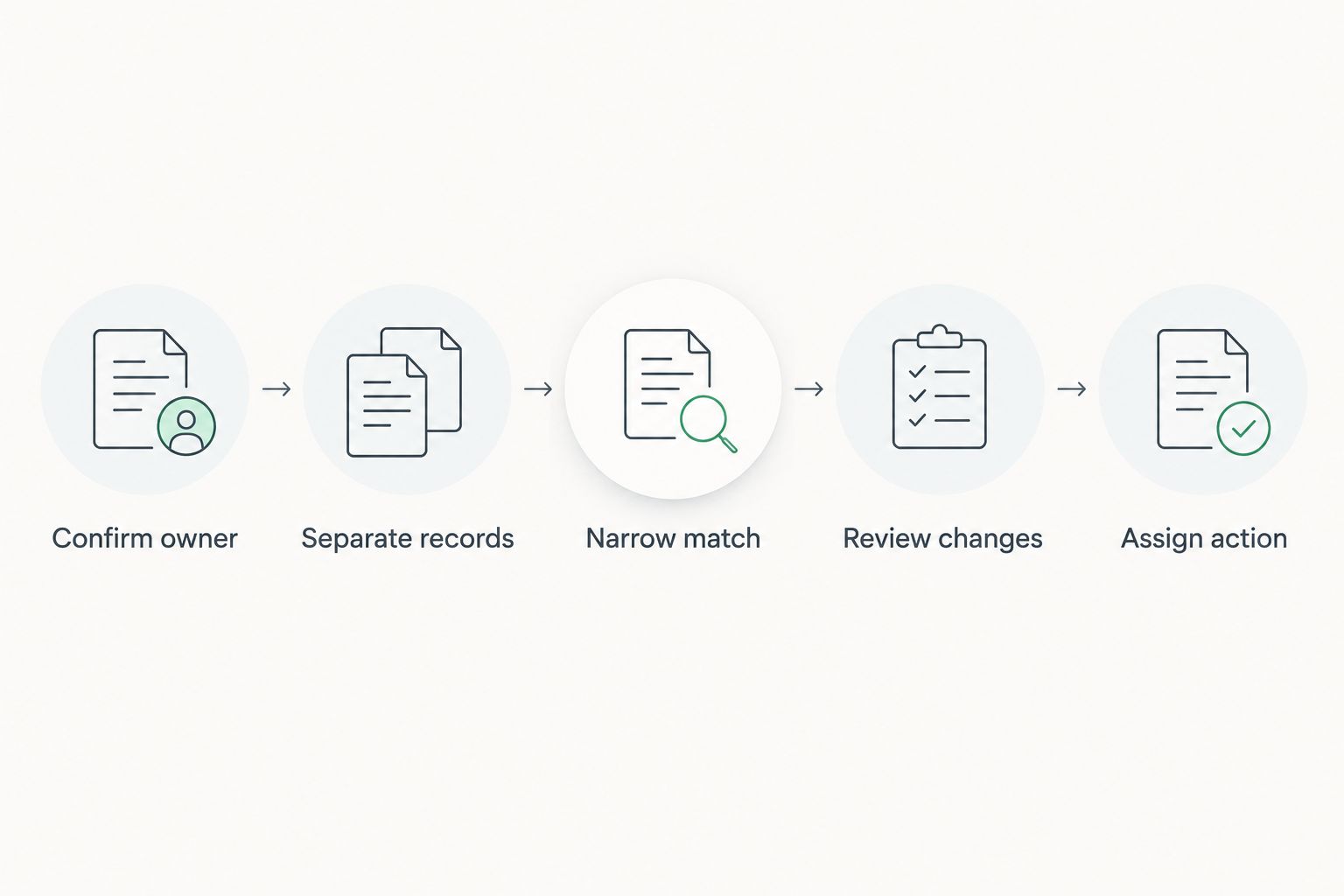
Yes, through published information associated with that owner. A useful workflow has 5 steps: identify the organization, distinguish record types, narrow the opportunity set, review changes, and qualify the next action.
1. Confirm the owner
Start with the organization’s full name as it appears in procurement records. Where a reliable identifier is available, use it alongside the name rather than relying on a familiar abbreviation alone.
Distinguish the project owner from the entity conducting procurement. A notice associated with a procurement agent does not establish that the agent owns the project. Record each organization’s role so your watchlist follows the intended buyer.
Best for: building an owner-specific watchlist. The benefit is a clearer organizational match; the limitation is that a name match alone does not establish the organization’s role in every record.
2. Separate record types
Classify each relevant result before assigning it to your sales or bid pipeline. Use 3 record types as a working structure: procurement plans, tender notices, and bidding results.
| Record type | Best for | Useful evidence | Limitation | Recommended action |
|---|---|---|---|---|
| Procurement plan | Early opportunity research | Published information about intended procurement | A plan is not an open invitation to bid | Track the package and verify later notices |
| Tender notice | Active opportunity assessment | Published invitation and access to applicable requirements | A matching notice does not establish your eligibility | Read the current documents and qualify the bid |
| Bidding result | Historical buyer research | Recorded outcome of a procurement process | A past award does not establish future demand | Use it as context, not an upcoming opportunity |
This separation prevents a historical award from inflating your upcoming pipeline. It also stops a planned package from being treated as submission-ready before the necessary notice and documents exist.
3. Narrow the match
Apply your business criteria after confirming the owner. Check the package scope, location, procurement status, and requirements against what your company actually supplies.
Keep the owner match and the commercial-fit assessment separate. A relevant buyer can publish an irrelevant package; an attractive package can belong to a different buyer with a similar name. Review both before assigning preparation work.
Best for: teams targeting named accounts. Owner-led tracking gives you account context, but it can exclude suitable opportunities from buyers outside your watchlist. Maintain a separate category search if your objective extends beyond those accounts.
4. Review changes
Choose a tracking process that lets your team identify newly published records and revisit existing opportunities. When evaluating software, check how it handles changed notices, amendments, source references, and the distinction between publication and retrieval dates.
Do not assume that an alert is the final version of a procurement requirement. Open the current source documents before making a submission decision. If you route notifications into another system, keep a route back to the underlying record; the guide to connecting tender alerts to your CRM addresses that handoff.
5. Assign an action
Give each qualified record an internal next action: continue monitoring, review documents, or stop pursuing. Assign responsibility so the record does not remain an unowned notification.
Make 2 decisions separately: whether the opportunity fits your business, and whether the published material supports bid preparation now. A good commercial fit still belongs on a watchlist if the package has not reached an actionable stage.
This is the central rule for a 2026 owner-tracking workflow: track early signals broadly, but authorize bid work against verified requirements.
Procurement plans: best for early research
A published procurement plan helps you identify intended purchasing activity before treating a package as an active bid. Use the available description to assess whether the subject fits your capabilities and warrants continued attention.
The advantage is context. You can organize internal research around a named owner and an identified requirement rather than an unsupported expectation of future work.
The limitation is equally important: a published plan does not guarantee an unchanged scope, schedule, or eventual tender. Keep the record labelled as planned procurement until subsequent published material supports a different status. Do not present it internally as a confirmed bidding opportunity.
Tender notices: best for active qualification
A tender notice moves your work from general monitoring toward document review. Read the applicable requirements, deadlines, submission instructions, and amendments before deciding whether to participate.
The advantage is a defined procurement opportunity that your team can assess against its capabilities. The limitation is that the notice headline or search summary does not contain everything required for a sound bid decision.
For a 2026 bid register, retain the source reference and the date your team checked it. Those fields distinguish what the source published from when your team last verified the information.
Bidding results: best for historical context
Bidding results help you research completed procurement activity. Use them to understand recorded outcomes associated with an owner and to structure further investigation into relevant packages and contractors.
The benefit is evidence of past activity. The constraint is that historical activity does not prove a forthcoming purchase, an unchanged requirement, or a future award outcome.
Dauthau bidding-intelligence software supports analysis of bidding results alongside tender and contractor data. Keep that historical analysis separate from the list of packages your team considers open or upcoming.
Why owner-tracking coverage varies
The useful question is not whether software can promise every future opportunity. It is whether its covered records and matching process support the owner and procurement categories you need to follow.
Check these factors when assessing a system:
- Publication scope: Determine which public and private procurement sources the system includes. A tracking workflow cannot establish the contents of an unpublished record.
- Organizational identity: Check how the search distinguishes the project owner, procuring entity, and other named organizations. Similar names require review.
- Record status: Confirm that planned procurement, active notices, and completed results remain distinguishable in searches and exports.
- Change handling: Ask how revised records and amendments appear. Verify the current source documents rather than treating a previous notification as final.
- Business filters: Check whether the available search criteria let you isolate relevant scope and locations without obscuring the owner match.
Use actual published records for your evaluation. Select examples relevant to your business and trace each result back to its source. A broad feature description is less useful than confirming that the workflow preserves the identity, status, and document references you need.
How should you evaluate owner tracking before adopting it?
Evaluate owner tracking against a written task, not a general product demonstration. Your task should name the buyer, describe relevant work, and state which publication stages you want to monitor.
Ask the provider to show how a published record moves through the process. Confirm how you find it, identify the associated organizations, interpret its status, and reach the supporting documents. Request clarification wherever an interface label differs from the source terminology.
Then assess the handoff to your team. Decide who checks new records, who reviews eligibility, and who authorizes preparation. Software organizes information; your qualification process determines whether a tender deserves effort.
For 2026 procurement monitoring, Dauthau is relevant when your requirement is Vietnamese tender search, tracking, and analysis. Evaluate any additional requirement—such as a particular notification channel or integration—against the functionality offered for your intended use.
Can I track a project owner before a tender opens?
Yes, when published planning information identifies relevant procurement. Keep it in an early-research stage and monitor for subsequent notices rather than assuming that bid preparation can begin immediately.
A project announcement without sufficient procurement detail is a research lead. Record what it actually establishes, and avoid filling gaps with assumed packages or dates.
Can software find tenders that have not been published?
No—published-record tracking does not disclose an owner’s undisclosed purchasing decisions. Private procurement information also depends on what is shared and what the platform covers.
Separate a forecast from a documented opportunity. Historical awards and project context can guide research, but neither establishes that a new tender exists.
Should I track the owner or search by keyword?
Use owner tracking for named-account research and keyword searches for broader opportunity discovery. Neither replaces the other when you need both buyer context and coverage beyond a selected account list.
Owner tracking is narrower by design. Keyword searching reaches beyond your watchlist, but each result still needs an organizational and scope check before qualification.
FAQ
Can bidding software track a project owner’s upcoming tenders in Vietnam?
Yes, bidding software can track upcoming opportunities through published records associated with a project owner, subject to its data coverage. Separate procurement plans from open tender notices and historical bidding results.
Does an upcoming tender mean I can submit a bid now?
No, an upcoming tender is not necessarily open for submission. Verify the applicable notice, current documents, and submission requirements before preparing a bid.
What should I search if the project owner uses different names?
Search the organization’s published name and verify its identity using reliable identifiers where available. Check whether each record names the project owner or another organization involved in procurement.
Can tender software track private procurement too?
Private procurement tracking depends on the information shared and the platform’s source coverage. Confirm coverage for your intended buyers rather than assuming that public and private procurement records are equally accessible.
Can past bidding results predict an owner’s next tender?
Past bidding results do not establish an owner’s next tender. Use historical outcomes as research context and require current published evidence before classifying a package as upcoming.
Do tender alerts replace checking the source documents?
No, tender alerts do not replace checking the current source documents. Verify requirements and amendments before making a submission decision.
What should my team do after finding an owner-matched tender?
Confirm the organization, classify the record’s status, and assess the package against your capabilities. Assign a responsible person to review the documents or continue monitoring.
One last thing
Keep the source publication date and your last verification date separate. They answer different questions: when the information was published, and when your team last checked it.
That distinction makes your 2026 opportunity register easier to act on. A recent internal update should never make an old procurement record look like a newly published tender.