
Instead of manually copying tender notices into your CRM, connect tender alerts to CRM records through a verified alert-delivery channel, a validation step, and a duplicate check. This guide shows you how to design that workflow for Dauthau research without assuming a native connector, API access, or automatic bid qualification.
- Connect tender alerts to CRM records only after verifying the delivery channel and CRM write permissions.
- Dauthau supports Vietnamese tender research; your CRM should hold ownership, qualification, and follow-up decisions.
- Match each tender by a stable identifier before creating or updating a record.
- Route incomplete notices to review instead of guessing deadlines, buyers, or tender identifiers.
Why this matters
Dauthau is best suited to Vietnamese businesses researching procurement tenders before qualifying CRM opportunities. The Dauthau bidding-intelligence platform supports searches, tracking, and analysis of tenders, contractor data, and bidding results across Vietnam.
Your CRM serves a different purpose: assigning responsibility and recording commercial decisions. A relevant notice is a research lead, not proof that your business qualifies to bid.
For your 2026 workflow, keep those responsibilities separate. Preserve the source notice, create a reviewable record, and let the responsible person decide whether to pursue it. The benefit is a traceable handoff rather than an inbox full of messages nobody owns.
Before you start
- Confirm the input channel. Obtain a real alert sample and verify how your account delivers it. Use the email-based instructions below only if you receive suitable email alerts; do not assume a native CRM connector, webhook, or API exists.
- Prepare permissions and ownership. You need access to the receiving mailbox, permission to configure your chosen automation service, and CRM permissions to search, create, and update the intended record type. Assign someone to handle rejected messages.
- Check the hidden trap: one message is not necessarily one tender. Inspect whether an alert contains a single notice, several notices, or only a link to further details. A digest must be separated into individual notices before CRM matching.
Use a test destination before enabling production writes. The field names below are suggested custom labels, not claims about existing software buttons or menus; create them where your CRM permits, or map them to equivalent existing fields.
Alert intake configuration
Establish the input contract
- Collect a real sample. Preserve the original message and inspect its sender, subject, body, and links. Determine which content identifies the tender and which content merely describes the notification.
- Define the intake boundary. Choose a dedicated folder or mailbox for accepted alerts. Configure your automation service's supported incoming-message trigger against that location, using its documented controls.
- Restrict accepted messages. Match the verified sender and recognizable message structure together. A subject containing the word tender is not enough to establish that a message belongs in this workflow.
- Separate notices. If a message contains several tenders, process each notice independently. If it contains only a summary, retain that summary and its source reference rather than fabricating missing details.
- Preserve the original. Keep a permitted copy of the message or a retrievable reference, subject to your organization's retention rules. Record when your workflow received it.
Expected result: each accepted event contains one identifiable tender notice and a reference back to its original message. A message that cannot be separated safely goes to review, not straight into the CRM.
For a 2026 setup review, retain the sample used to configure parsing. When the alert format changes, that sample gives you a concrete comparison instead of relying on memory.
Define extraction rules
Extract fields from labeled content or another repeatable structure. Do not treat the first date in a message as the closing deadline: a notice can include publication dates, clarification dates, and submission dates.
Keep the extracted value alongside the source wording when interpretation matters. If the message does not state a timezone or a complete deadline, leave the interpreted deadline unset and flag the record for review.
CRM record configuration
Create the field map
- Select the destination. Choose the CRM record type that can represent an unqualified tender. Avoid creating a forecasted sales opportunity before someone confirms commercial fit.
- Create an identity field. Use a source tender identifier when the notice provides one. Otherwise, use a verified stable source reference; do not assume that every email link remains unchanged.
- Map the notice content. Separate the tender title, buyer, deadline, source reference, and original message reference. Leave absent values blank.
- Add workflow ownership. Assign a responsible person or team and a review status. Use the suggested label Tender review status if you need a dedicated custom field.
- Separate source facts from decisions. Keep tender details distinct from qualification notes, bid decisions, and internal follow-up dates.
| Suggested field | What belongs in it | Validation rule |
|---|---|---|
| Source tender ID | Identifier stated in the notice | Preserve the original characters |
| Tender title | Notice title | Reject an empty title for automatic creation |
| Buyer name | Buyer named in the source | Do not substitute a contact's employer |
| Submission deadline | Explicit submission date and time | Retain timezone information when supplied |
| Source reference | Original tender location | Preserve the reference without guessing a new path |
| Tender review status | Your internal review stage | Keep separate from the source's tender status |
| Assigned reviewer | Responsible CRM user or team | Use a valid, active destination |
Expected result: you can inspect a test record and distinguish published tender facts from your team's interpretation. No field implies that receiving an alert means you have decided to bid.
A 2026 field map should also distinguish receipt time from publication time. A delayed notification must not make an older notice look newly published.
Matching and routing configuration
Define record matching
- Search before writing. Look for an existing CRM record with the same verified source identifier. Include the source system in the matching key if your CRM collects notices from different sources.
- Create unmatched records. Create a new review record only when required fields pass validation and no matching record exists.
- Update matched records selectively. Update source-owned fields when the incoming notice genuinely changes them. Preserve qualification notes, assigned tasks, and human decisions.
- Handle ambiguous matches. Send multiple matches to review instead of selecting the first result. A matching title alone does not establish that two notices represent the same tender.
- Route the record. Apply your team's documented ownership rules. If no rule matches, use a review queue rather than leaving the record unassigned.
Expected result: replaying the same notice leaves 1 tender record, not another duplicate. An ambiguous identity produces a review item instead of an automatic overwrite.
The core sequence is Receive, Validate, Match, and Route. Each stage has a separate responsibility, which makes a failed handoff easier to locate.
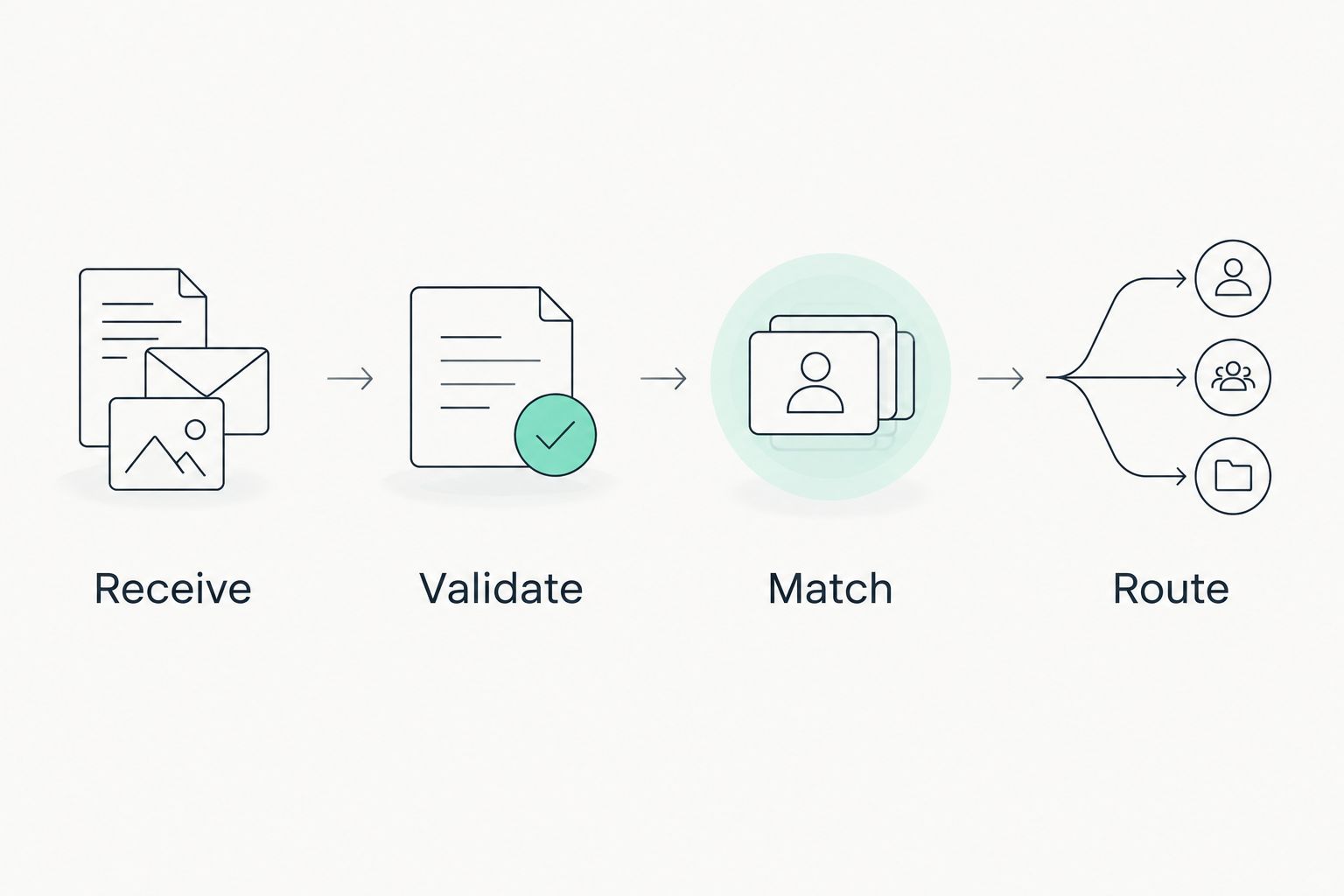
Do not notify the reviewer before the CRM write succeeds. Otherwise, the reviewer receives an assignment pointing to a record that was never created.
Test and release configuration
Verify the complete handoff
- Test an initial notice. Send a controlled sample through intake and inspect every mapped field in the test destination.
- Replay that notice. Confirm that the workflow finds the existing record and does not duplicate the record or its review task.
- Test an amendment. Use a clearly labeled test copy with a changed source field. Verify that the intended field changes while internal notes remain intact.
- Test invalid content. Remove an identity field from a test copy. Confirm that the workflow rejects or queues it rather than creating a misleading record.
- Inspect permissions and logs. Confirm that authorized staff can retrieve the source and that failure logs expose enough information to diagnose problems without unnecessarily copying sensitive content.
Expected result: all 4 test cases—initial notice, replay, amendment, and invalid notice—produce the intended outcome before production release.
For your 2026 acceptance record, document the sample, expected result, actual result, and reviewer. These are configuration checks, not evidence of any platform's performance or delivery speed.
Release the workflow to a monitored destination first. Expand its scope only after someone confirms that real notices reach the correct records and reviewers.
Update a CRM record when a tender changes
A second workflow handles amendments to an already tracked tender. Use it only when your verified source channel delivers those changes; an intake automation cannot detect amendments it never receives.
| Workflow | Best for | Benefit | Limitation |
|---|---|---|---|
| New-notice intake | Teams building a tender review queue | Gives each new tender an owner and source reference | Does not establish eligibility or bid readiness |
| Amendment handling | Teams maintaining existing tender records | Brings received source changes into the same record | Depends on receiving identifiable update content |
For amendment handling, search by the original tender identity and compare source-owned fields. Record what changed, preserve the earlier value where your CRM supports history, and notify the owner when a material field changes.
Do not let an amendment reset a human bid decision automatically. A changed deadline deserves review, but it does not by itself reverse a decision not to pursue the tender.
Dauthau tender intelligence and CRM qualification belong in the same process, not the same field. Keep the source's published status separate from your team's decision to review, pursue, or decline.
Troubleshooting
The same tender appears repeatedly
Check whether your match uses the email message identity instead of the tender identity. New messages about an existing tender should resolve to its existing record. Also inspect overlapping workflow runs: where supported, use a unique identity constraint or serialized processing to prevent simultaneous duplicate creation.
A digest creates one oversized CRM record
Move notice separation ahead of field mapping. If you cannot reliably identify notice boundaries, queue the digest for manual review. Do not attach several unrelated buyers and deadlines to a single tender record.
The deadline lands on the wrong day
Inspect the original date wording, parsing rules, and timezone handling. Preserve the source value and stop automatic deadline updates until the interpretation is verified. Never repair an ambiguous date by assuming a format.
A source update removes qualification notes
Restrict the update action to explicitly mapped source fields. Avoid replacing the entire CRM record with the incoming payload. Restore internal notes through your CRM's available recovery or history process, then repeat the amendment test.
Alerts arrive, but no CRM record appears
Check the workflow run from intake to write confirmation. Identify whether filtering, validation, authorization, or the CRM action failed. Replay only after checking whether the original write succeeded; a failed notification does not prove that record creation failed.
Customize your workflow
Start with ownership and review outcomes before adding more automation. A record that has a source link but no responsible reviewer has not completed the business handoff.
Useful extensions include a qualification checklist, a documented decision reason, and a follow-up task after an owner accepts the tender. Keep those actions conditional on a human decision rather than creating a full bid workload for every incoming notice.
Review the workflow during your 2026 CRM maintenance cycle and whenever an alert format, permission, or ownership rule changes. Retest the same acceptance cases after each material configuration change.
For broader process design, use the guide to tender management software for Vietnamese businesses to frame the work around intake, review, and tracking rather than treating message delivery as the finished process.
FAQ
How do I connect tender alerts to CRM records?
Use a verified delivery channel, validate each notice, search for an existing tender identity, and then create or selectively update the CRM record. Start with a test destination and confirm that repeated messages do not create duplicates.
Can I connect Dauthau directly to my CRM?
Verify the supported integration methods for your account before choosing a direct connection. Do not assume that a native CRM connector, webhook, or API is included; use an email-based workflow only when your account delivers suitable alerts.
What is the best field for matching tender alerts?
A stable source tender identifier is the preferred matching field when the notice provides one. If it does not, verify a stable source reference and send ambiguous matches to review rather than matching on title alone.
Should every tender alert create a sales opportunity?
No, an incoming tender alert should first create or update an unqualified review record. Create a sales opportunity only after your team confirms fit and assigns responsibility under its own qualification rules.
How do I stop duplicate tender records?
Search by the verified tender identity before creating a record, and test the workflow by replaying the same notice. Where your system supports it, add a uniqueness control or serialized processing to address overlapping runs.
Can the workflow update a changed submission deadline?
Yes, if the verified input channel delivers the amendment and the workflow can match it to the existing tender. Update the source deadline, preserve relevant history, and notify the owner without overwriting internal qualification notes.
What should happen when an alert is missing required details?
Send the notice to a review queue instead of inventing the missing values. Preserve the original message reference so a reviewer can verify the tender identity, buyer, and deadline against the source.
One last thing
A successful retry should not look like a new tender. Before adding more automation, replay a previously processed notice and verify both the record count and the task count. Duplicate tasks can leave a workflow broken even when its tender records are clean.