
Instead of manually recounting competitors’ wins whenever a tender result changes, build a bidding results to win rate report workflow that links verified participation to final outcomes. Use this 2026 guide to organize procurement records from Dauthau in Google Sheets, calculate comparable rates, and update reports without counting the same award twice.
- Dauthau supports Vietnamese tender research; this bidding results to win rate report workflow calculates competitor performance in Google Sheets.
- Calculate wins divided by wins plus confirmed losses, not wins divided by every tender found.
- Keep pending, cancelled, and unknown outcomes outside the decided-bid denominator.
- Match contractor identifiers, package identifiers, and lots before comparing competitor win rates.
Why this matters
Dauthau is best for Vietnamese businesses researching tenders, contractors, and bidding results. The platform supports procurement intelligence; the spreadsheet workflow below turns verified records into a defined competitor metric without assuming a built-in export or integration.
An award notice identifies a winner, but that alone does not establish every other company’s participation. Treating every competitor that did not win as a losing bidder creates a denominator unsupported by evidence.
For your 2026 report, define win rate as confirmed wins divided by confirmed wins plus confirmed losses within a stated scope. Label it an observed win rate when your records do not cover every eligible participation. A percentage describes the records you verified, not an unconditional probability of winning the next tender.
Before you start
- Access and materials: Have access to the tender, contractor, and result records you will research, plus a Google account with permission to edit the reporting spreadsheet. Confirm access to the supporting documents before building the report.
- Reporting rules: Write down the competitor list, procurement categories, geographic scope, reporting period, and date basis. For a 2026 annual cohort, use final decision dates from January 1 through December 31, 2026, and show your actual cutoff date.
- The denominator gotcha: Collect evidence of participation, not just award announcements. Missing participant information means an unknown outcome, not a confirmed loss; separate lot-level decisions from package-level summaries.
Reporting scope and workbook setup
Establish the reporting unit
- Choose one row per contractor per independently decided procurement unit. Use a lot when lots receive separate decisions; otherwise use the package. Do not mix package totals and their underlying lots in the same calculation.
- Identify competitors using a verified contractor identifier. Keep the legal name as a readable label, but do not use name spelling alone to merge records.
- Define the consortium policy. Either retain a consortium as a distinct bidding entity or attribute participation to verified members consistently. Do not alternate between those treatments across competitors.
- Record your date basis and exclusions in a sheet named
Method. State whether the report covers public procurement, private procurement, or both.
Expected result: Every counted participation has a defined contractor, procurement unit, reporting period, and treatment rule. Another analyst can reproduce the scope without guessing what a row represents.
Create the workbook
Create three working sheets named Results, Summary, and Evidence. Keep the methodology in Method; these are workbook names you create, not platform interface labels.
Use the following columns in Results:
| Column | Header | What belongs here |
|---|---|---|
| A | Record key | Combined package, lot, and contractor identifiers |
| B | Package ID | Stable identifier from the procurement record |
| C | Lot ID | Lot identifier, or a consistent package-level marker |
| D | Contractor ID | Verified identifier for the bidding entity |
| E | Contractor name | Readable legal name |
| F | Decision date | Date of the applicable final decision |
| G | Outcome | Won, Lost, Pending, Cancelled, or Unknown |
| H | Segment | Your consistently assigned reporting category |
| I | Source reference | Document reference or source location |
| J | Checked date | Date you last verified the record |
- Enter the headers in row 1. Start participation records in row 2.
- Select the populated range, then choose Data and Create a filter in Google Sheets. Use the filter to inspect missing identifiers and inconsistent outcomes.
- In A2, enter
=B2&"|"&C2&"|"&D2, then fill down. Use the same package-level marker whenever a procurement has no separately decided lots. - Store document references and explanatory notes in
Evidence. Preserve earlier decisions there rather than deleting the history when a result changes.
Expected result: Your workbook separates current reporting records from supporting evidence. Each participation has a repeatable key, while revised documents remain traceable.
Verified participation and outcome records
Assign evidence-backed outcomes
Use Dauthau to research the relevant tender results and contractor records, then enter verified facts in the workbook. This process does not depend on an undocumented API, connector, or export feature.
- Confirm that the contractor participated in the procurement unit before creating a decided participation record.
- Assign
Wonwhen the applicable result identifies that contractor as successful for the unit. AssignLostonly when participation and an unsuccessful final outcome are supported. - Assign
Pendingwhen participation is verified but the outcome remains unresolved. UseCancelledfor cancelled procurement units andUnknownwhen the available evidence cannot establish the outcome. - Record the decision date, source reference, and checked date. Leave an unavailable decision date blank rather than substituting the date you performed the research.
- Check whether a later decision supersedes the earlier result. Update the current row and preserve the superseded evidence separately.
Expected result: Every win and loss is supported by a source, while unresolved and cancelled records remain visible without distorting the denominator.
Resolve identity and duplication
Check repeated record keys before calculating any rate. Two notices about the same contractor and lot are not two participations.
Compare the contractor identifier, package identifier, lot identifier, and applicable decision. Resolve repeated keys against the evidence, retaining one current reporting row for the procurement unit. Do not delete records merely because contractor names look similar.
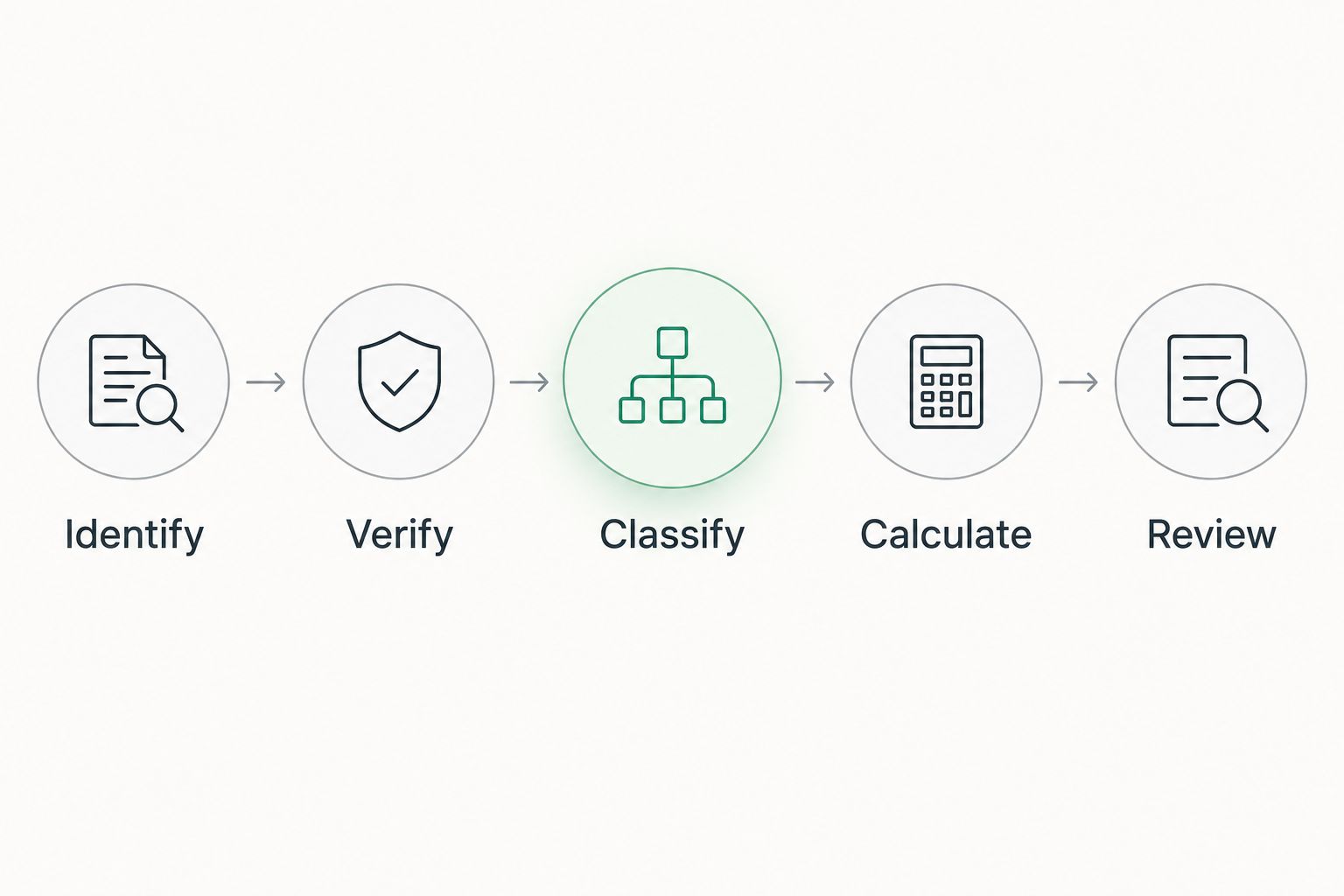
Use this sequence for every record:
- Identify: Match the contractor and procurement unit.
- Verify: Establish participation and the applicable outcome.
- Classify: Assign the reporting status consistently.
- Calculate: Include only confirmed decided outcomes.
- Review: Check revisions and supporting evidence.
Win-rate calculations and report checks
Build the competitor summary
In Summary, create these headers: A Contractor ID, B Wins, C Losses, D Pending, E Win rate, and F Unknown. Enter one verified competitor identifier per row in column A.
- In B2, enter
=COUNTIFS(Results!D:D,A2,Results!G:G,"Won"). - In C2, enter
=COUNTIFS(Results!D:D,A2,Results!G:G,"Lost"). - In D2, enter
=COUNTIFS(Results!D:D,A2,Results!G:G,"Pending"). - In E2, enter
=IF(B2+C2=0,"",B2/(B2+C2)). - In F2, enter
=COUNTIFS(Results!D:D,A2,Results!G:G,"Unknown"), then fill all formulas down your competitor list. - Select column E and choose Format, Number, then Percent.
These formulas assume comma-separated function arguments. If your spreadsheet locale uses semicolons, replace the argument separators accordingly.
Expected result: Each competitor has visible win and loss counts alongside the rate. A competitor with no decided participations has a blank rate, not a misleading zero.
Apply the cohort before publishing
The formulas above count all matching rows in Results. Populate that sheet only with the defined reporting cohort, or add identical date and segment conditions to every count formula.
A visible filter does not change these COUNTIFS calculations. Hiding rows outside your chosen period is not enough to create a period-specific report.
Before publishing, reconcile the summary against the underlying rows:
- Confirm that wins plus losses equal the decided-participation denominator.
- Check that pending, cancelled, and unknown records do not enter that denominator.
- Display the competitor’s wins and decided-participation count beside the percentage.
- Use the same date basis, segment, and consortium policy across competitors.
- State the source scope, checked date, and unresolved-record limitations.
Expected result: Your report explains both the percentage and its evidence base. Readers can distinguish a strong observed result from a percentage supported by very few decisions.
Updated results and recurring reports
A recurring workflow is useful when procurement decisions change or new results enter your reporting period. Keep the same record key and update its current outcome instead of appending another counted participation.
Choose the reporting variant that matches the decision you need to make:
| Workflow | Best for | Benefit | Limitation |
|---|---|---|---|
| Fixed snapshot | Reviewing a defined reporting cutoff | Preserves exactly what informed a past decision | Does not incorporate later corrections |
| Refreshed report | Monitoring competitors throughout 2026 | Incorporates verified new and revised results | Requires revision history to explain changes |
- Open the supporting result record and compare it with the stored evidence.
- Match the existing record key. Update the outcome, decision date where appropriate, source reference, and checked date.
- Add a new row only for a genuinely new contractor–procurement-unit combination.
- Review the affected competitor’s counts and preserve the previous report when historical comparisons matter.
Expected result: A pending participation can become a win or loss without being counted twice. A corrected award changes the current report while leaving an explanation of the change.
For an adjacent collection workflow, use the tender alerts to Google Sheets guide. Keep opportunity alerts separate from verified result records: discovering a tender does not establish participation.
Troubleshooting
The win rate exceeds 100%
Check whether the numerator and denominator use different scopes or duplicated records. Recalculate both from the same contractor identifiers, date criteria, segment, and reporting unit; wins must be a subset of decided participations.
Competitors appear to lose tenders they never entered
The report has inferred participation from absence on the winner list. Remove unsupported losses and retain only verified participations; classify unresolved evidence separately instead of filling the gap with a loss.
The percentage stays unchanged after filtering
The COUNTIFS formulas still evaluate hidden rows. Use a cohort-specific Results sheet or add matching conditions directly to every summary formula. Confirm the denominator after changing scope.
One contractor appears under several names
Reconcile records using verified identifiers and supporting documents. Keep an alias note for search purposes, but do not merge different legal entities simply because names overlap.
A revised decision increases the participation count
A replacement notice has been appended as another current record. Match the record key, retain one current outcome, and move the superseded decision into the evidence history.
Customize your workflow
Start with competitor totals, then add a segment breakdown only when your source records support consistent classification. Compare contractors within the same procurement category and period rather than treating unlike portfolios as directly comparable.
Dauthau supports the research side of this workflow; the workbook adds your chosen denominator, evidence policy, and reporting logic. Keep those responsibilities separate: software access does not establish that every participant or decision is represented in your dataset.
For a useful next step, add a report note explaining what changed since the previous cutoff. Separate newly decided participations from corrections to earlier records so readers understand why a competitor’s rate moved.
FAQ
How do I turn bidding results into a competitor win-rate report?
Create one current record per verified contractor participation, classify the outcome, and divide wins by wins plus confirmed losses. Keep source references and apply the same reporting scope to every competitor.
Can I calculate win rate from winner announcements alone?
Winner announcements alone do not establish a competitor’s win rate because they do not necessarily identify all unsuccessful participants. Use participation evidence before assigning losses.
Should pending tenders count as losses?
Pending tenders should not count as losses. Keep them outside the decided-participation denominator until a supported final outcome is available.
Does this workflow require a Dauthau integration?
No, this workflow uses verified research records entered into Google Sheets. It does not require an API, automatic export, or a native reporting connector.
How should I handle tenders with separate lots?
Use a separate participation record for each independently decided lot. Do not count both the package summary and its underlying lot decisions in the same denominator.
Why does my spreadsheet filter not change the win rate?
COUNTIFS evaluates matching rows even when a filter hides them. Add the reporting conditions to the formulas or maintain a reporting sheet containing only the intended cohort.
What should a 2026 competitor win-rate report show?
Show wins, confirmed losses, decided-participation counts, and the calculated rate, together with the reporting cutoff. State the date basis, procurement scope, consortium policy, and unresolved-record limitations.
One last thing
A missing denominator is more damaging than a missing percentage. In your 2026 report, leave the rate blank when you cannot establish decided participation; publishing the verified win count with a clear limitation is more useful than presenting an unsupported success rate.