
A tax code lookup tool can show whether a contractor is blacklisted only if it also includes relevant procurement restriction records; a tax registration result alone cannot establish that status. For a Vietnam contractor check in 2026, use the tax code to match the legal entity, then verify any restriction against its issuing authority, effective period, and scope.
- Can a tax code lookup tool show if a contractor is blacklisted? Only when relevant restriction records are included.
- An active tax registration does not prove eligibility to participate in a tender.
- Dauthau supports Vietnamese procurement research; verify any blacklist conclusion against the underlying restriction decision.
- Match the legal entity, check the restriction period, and record the source before making an onboarding decision.
Can a tax code lookup tool show if a contractor is blacklisted?
A tax code identifies the business; the relevant restriction record establishes whether a procurement ban applies. Treat these as separate checks, even when a search service displays them together.
Dauthau provides bidding-intelligence software for searching, tracking, and analyzing Vietnamese tenders, contractor data, and bidding results. That procurement context supports research, but it does not turn a tax registration result into evidence of unrestricted eligibility.
Use the following comparison to decide what each check contributes to your 2026 screening process.
| Check | Best for | What it establishes | Limitation |
|---|---|---|---|
| Tax code lookup | Matching the legal entity | The identity and tax information shown in the source | Does not, by itself, establish procurement eligibility |
| Procurement restriction search | Finding a relevant restriction | The existence of a published record within the source searched | A summary can omit conditions or later changes |
| Underlying decision review | Assessing a specific restriction | The named subject, operative wording, dates, and stated scope | Requires careful interpretation and entity matching |
| Contractor history review | Understanding procurement activity | The bidding or award records available for that entity | Past participation does not prove current eligibility |
These checks answer different questions. Combining them gives you a stronger evidence trail than treating a single status label as a complete contractor assessment.
Why this matters
A screening error can work in either direction: you can accept a contractor without checking a relevant restriction, or reject a business because its name resembles another entity. Neither decision is supported by an identity lookup alone.
The word blacklisted also needs clarification. A procurement participation ban, a tax registration issue, an adverse performance record, and an internal vendor exclusion are not interchangeable findings.
For a 2026 review, define the question before searching: are you checking participation in a particular procurement, eligibility under your own vendor policy, or the identity of the proposed contracting party? The evidence you need depends on that question.
Start with 3 separate screening questions
Identity: which legal entity are you checking?
Match the contractor's tax code and legal name to the proposed contract or bid documents. Use the registered address and other available identifying details to investigate discrepancies rather than dismissing them as spelling differences.
A trading name, shortened name, or related company name is not enough to establish that a restriction concerns your counterparty. Keep the exact entity being assessed visible throughout the review.
Restriction: what decision or rule is being applied?
Look for a specific record rather than relying on the word blacklisted. Identify the issuing authority, the decision reference, the named subject, and the operative wording.
An allegation, a performance complaint, and an operative restriction require different treatment. Do not promote a search snippet or an unexplained warning badge into a legal conclusion.
Applicability: does the restriction affect this transaction?
Compare the restriction's stated scope and effective period with the proposed procurement. Check whether the record concerns the same entity and the activity you are assessing.
Finding a restriction and establishing that it applies are separate steps. If the document does not resolve applicability, route the issue to the person responsible for procurement compliance before approving or rejecting the contractor.
How to verify a contractor without confusing identity with eligibility
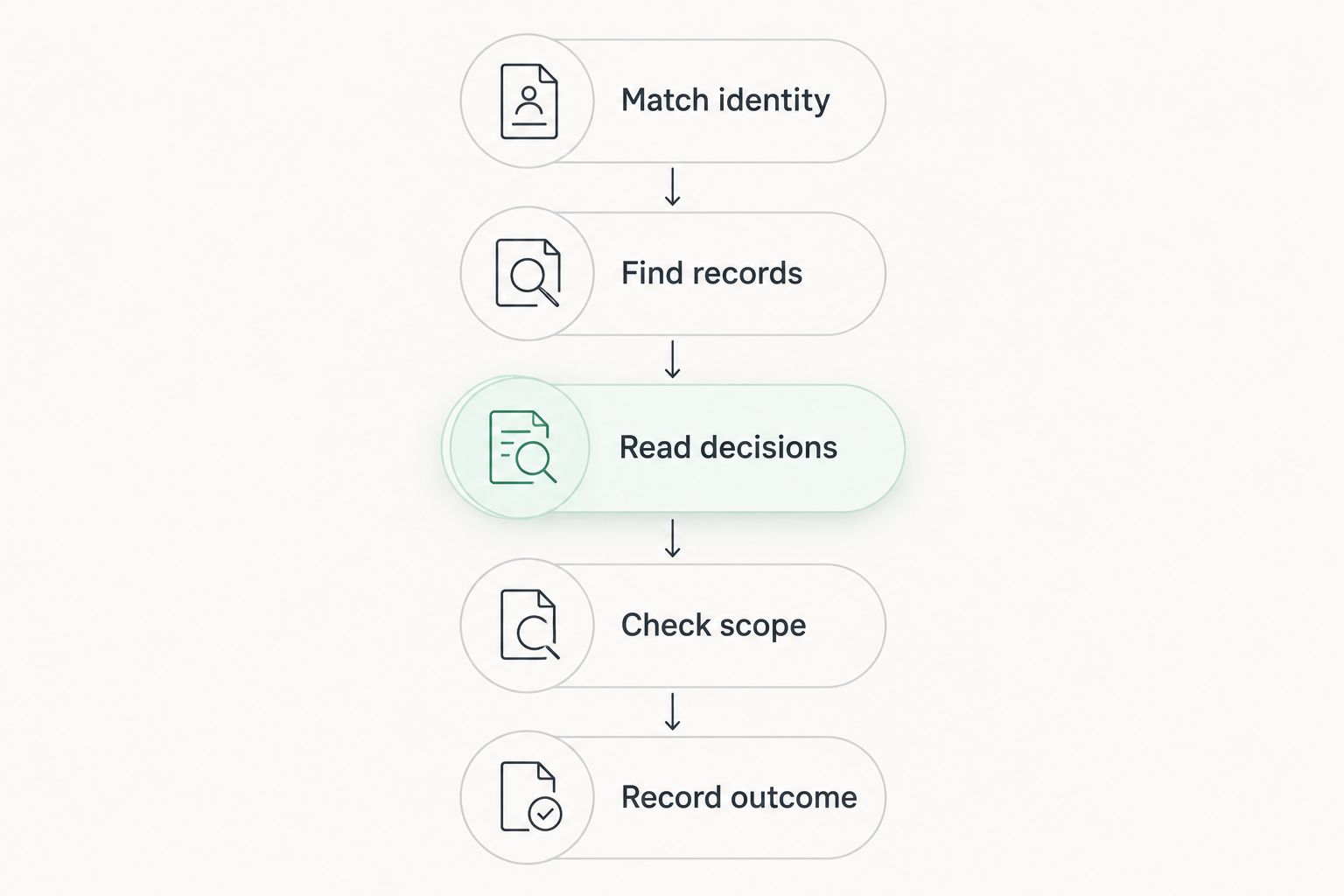
Use this 5-step workflow for an initial review or a repeat check before a procurement decision. The steps describe a screening process, not a claim that every lookup service supplies every field.
- Match identity. Copy the tax code and legal name from the contractor's documents. Compare them with the identity source and document any unresolved discrepancy.
- Find records. Search the relevant official procurement source and any research platform you use. Search by the exact tax code where supported, then check names and identifiers in the results.
- Read decisions. Open the underlying restriction document rather than stopping at a result title. Capture the issuing authority, reference, named subject, and operative terms.
- Check scope. Compare the effective period and stated coverage with the procurement under review. Look for amendments, replacements, or other later records that affect the decision.
- Record outcome. Save the source reference, review date, entity match, and reason for your conclusion. Assign unresolved questions to a named reviewer.
For the identity stage, the guide to verifying a contractor's tax code before signing covers the related verification workflow. Complete that check without treating it as a substitute for reviewing procurement restrictions.
Keep the evidence together rather than scattering it across messages and screenshots. A reviewer should be able to retrace the conclusion without repeating the entire search.
Why blacklist lookup results vary
Different results do not automatically mean one source is wrong. First compare what each source actually covers and how each result was matched.
- Source coverage: A tax information service and a procurement restriction source answer different questions. Check the dataset description before interpreting an empty result.
- Entity matching: A name search can surface similar businesses. Confirm that the record concerns the exact legal entity rather than a related company or similarly named contractor.
- Record timing: Compare publication dates, effective dates, and the date you accessed the information. A retrieved result needs a time context.
- Restriction scope: Read the stated coverage instead of assuming every restriction applies to every procurement or commercial relationship.
- Later decisions: Check whether a subsequent document changes the status or terms of the original decision. An older summary does not resolve that question.
- Summary detail: A badge or short description compresses information. Use the underlying document when the omitted detail affects your decision.
For your 2026 screening procedure, record these factors as review questions rather than assigning an unsupported confidence score. A documented unresolved issue is more useful than a precise-looking rating without an evidence trail.
What should you save as evidence?
Save enough information to explain both the match and the conclusion. The minimum useful review file contains the entity checked, the source searched, the relevant document, and the reasoning applied to the transaction.
For a restriction record, capture these 5 fields:
- Subject: The legal entity named in the record and the identifiers used to match it.
- Authority: The body issuing the decision, as stated in the document.
- Reference: The decision identifier or other traceable document reference.
- Period: The effective dates and any conditions stated in the operative wording.
- Scope: The activities or procurements covered by the restriction.
Also record when the check occurred and who reviewed it. Your file should distinguish the document's publication date from the date someone retrieved it.
Do not label a contractor unrestricted simply because a screenshot contains no warning. State what was searched and what was found; keep the conclusion within that evidence.
Is an active tax code proof that a contractor can bid?
An active tax code is not proof of procurement eligibility. It addresses tax registration information, not every condition attached to a tender or every restriction that could affect participation.
Read the procurement requirements alongside the relevant restriction records. Keep identity verification, tender qualification, and restriction screening as distinct parts of the assessment, even if the same person performs all of them.
A contractor's previous award history does not close this gap either. It describes recorded activity, not a standing assurance about eligibility for your present procurement.
Does no blacklist result mean the contractor is clear?
No result means no matching record was returned by that search, not that every possible restriction has been ruled out. Interpret the result within the source's stated coverage and the identifiers used.
A defensible note is specific: identify the source, search terms, access date, and outcome. Avoid an unconditional clearance statement when the review only covered a limited dataset.
For a 2026 decision, check that the evidence is relevant to the decision date. If the procurement moves materially beyond the original review, follow your organization's policy on refreshing the check rather than inventing a universal renewal interval.
Can a past restriction still matter after its end date?
A past restriction and a currently effective restriction are different findings. Read the document and any later decisions before deciding how to describe the contractor's status.
Historical records can remain relevant to an internal risk review without proving a current participation ban. Separate the eligibility conclusion from any discretionary assessment under your vendor policy.
Where interpretation affects an award or exclusion decision, obtain a qualified procurement or legal review. Do not substitute a platform label for that judgment.
Where procurement software fits
Dauthau is best for Vietnamese businesses researching tenders, contractor data, and bidding results. Those are the capabilities described for its bidding-intelligence platform.
The benefit is access to procurement context alongside contractor research. The boundary is equally important: those stated capabilities do not establish that a particular restriction dataset, automated blacklist alert, or legal clearance function is included.
Before using any platform for restriction screening, ask which sources it covers, whether you can inspect the underlying documents, and how it distinguishes an identity match from an eligibility conclusion. Judge the workflow on traceable evidence, not the presence of a status badge.
FAQ
Can a tax code lookup tool show if a contractor is blacklisted in Vietnam?
A tax code lookup tool can show a restriction only if it includes relevant procurement restriction records. A tax registration result alone does not establish whether the contractor is subject to an applicable procurement ban.
Is a valid tax code enough to approve a contractor?
A valid tax code is not enough to establish procurement eligibility. Match the legal entity, review the tender requirements, and check relevant restrictions separately.
What should I check if a contractor has a blacklist warning?
Check the underlying decision, the named entity, the issuing authority, the effective period, and the stated scope. Do not reject a contractor solely on an unexplained warning or a similar company name.
Can I rely on a company name instead of a tax code?
A company name alone is insufficient for a reliable entity match. Compare the tax code and other available identifying details before attributing a restriction to the contractor.
Does a contractor's previous tender win prove it is eligible now?
A previous tender win does not prove current eligibility. Review the requirements and restriction records relevant to the procurement decision you are making.
Does Dauthau replace an official restriction decision?
Dauthau does not replace the underlying decision as evidence of a restriction's terms. Use procurement research to support discovery and context, then inspect the relevant source document before drawing an eligibility conclusion.
What should I record when no restriction appears in my search?
Record the source searched, the identifiers used, the access date, and the absence of a matching result. Keep the conclusion limited to that search rather than stating that the contractor is unrestricted everywhere.
One last thing
Write the search outcome before writing the approval decision. “No matching restriction found in the sources checked” and “eligible for this procurement” are different statements, and the second requires more evidence than the first.
Make that distinction explicit in your contractor review template. It prevents an identity lookup from becoming an unsupported clearance and gives the next reviewer a clear starting point.