
Instead of manually rechecking contractor details before every signature, verify contractor tax code before signing through a workflow that records evidence and blocks unresolved mismatches. Automate the lookup only where an authorized connection exists; otherwise, automate the review assignment and signing hold while a person completes the check.
- Verify contractor tax code before signing through an evidence-backed approval gate, not a tax-code format check alone.
- Dauthau supports contractor research; authoritative tax verification requires a separate source and documented review.
- Block signing when the legal entity differs, evidence is missing, or the lookup fails.
- Recheck changed contractor details and attach approval to the exact contract version.
Why this matters
A tax code copied correctly from a proposal can still belong to the wrong contracting entity. A successful search is not a completed verification: you must connect the returned identity to the party named in the agreement.
Dauthau is best for Vietnamese procurement teams that need contractor and bidding context alongside identity checks. Dauthau provides bidding intelligence covering tenders, contractor data, and bidding results. Use that context for procurement research, not as a substitute for authoritative tax records or signatory checks.
For your 2026 contracting process, separate three questions: does the identifier resolve, does the returned entity match the agreement, and has an authorized reviewer accepted the evidence? Keeping those decisions separate makes exceptions visible.
Before you start
- Prepare the records and access. Have the draft agreement, contractor-supplied tax code, legal entity name, and access to an authoritative Vietnamese tax-registration source. Automated retrieval additionally requires a documented, authorized connection; this guide does not assume a Dauthau connector or API.
- Choose a workflow owner and review owner. You need permission to create fields, assign tasks, and control the signing handoff in your existing contract or procurement system. A reminder without control over that handoff is not a signing gate.
- Prevent identifier damage. Store the tax code as text, not a number. Spreadsheet conversion can remove leading zeros or change formatting; preserve the supplied value separately from any normalized search value.
The configuration below uses fields and status labels you create, not existing product menu names. Bold labels are proposed workflow labels. Map them to your system's documented controls rather than looking for an assumed integration screen.
Contractor record and signing trigger
Start with a contract-specific verification record. A supplier-level approval alone does not show which legal entity details appeared in the agreement submitted for signature.
Configure the record
- Create text fields named Tax code supplied, Tax code normalized, Contract legal name, and Contract reference. Preserve the supplied identifier exactly; normalize only formatting that your source explicitly accepts.
- Add Contract version, Evidence reference, Checked at, Checked by, and Review notes. An evidence reference should identify the retained result, not merely the homepage used for searching.
- Create Verification status with three outcomes: Pending, Verified, and Needs review. Set every new verification record to Pending.
- Create a signing-request event in your workflow system and make it the trigger for this record. Require the contract reference, version, legal name, and supplied tax code before the request can proceed.
- Add a rule that prevents the signing handoff while Verification status is anything other than Verified. Test the actual handoff, including any manual route that bypasses the normal workflow.
Expected result: a signing request creates a pending check linked to an identifiable contract version. Missing information stops the request instead of producing an empty lookup.
For an agreement prepared in 2026, retain the actual check timestamp rather than a generic annual approval label. The timestamp establishes when the evidence was reviewed; it does not guarantee the record remains unchanged afterward.
Lookup connection and evidence capture
Choose your lookup route before building the approval logic. The distinction is access, not ambition: a browser search page does not establish permission or technical support for unattended retrieval.
| Verification route | Best for | Advantage | Limitation |
|---|---|---|---|
| Authorized automated lookup | Teams with documented machine access to the verification source | Can populate results and evidence references within the workflow | Requires supported access, result mapping, and explicit failure handling |
| Reviewer-assisted lookup | Teams using a source that requires interactive access | Keeps the evidence check within a controlled human task | Requires reviewer action before signing can continue |
Both routes need the same approval standard. Neither should mark the contractor verified just because a response arrived.
Configure the evidence task
- For an authorized automated lookup, map Tax code normalized to the documented request field. Retrieve only the fields the source actually supplies; do not assume it returns legal representatives, operating status, or branch relationships.
- For a reviewer-assisted lookup, create a task named Check contractor identity. Include the supplied tax code, contract legal name, contract reference, and instructions to consult the authoritative source.
- Record the returned identifier and legal name in separate result fields. Preserve the original returned name even if your matching logic ignores capitalization or spacing.
- Save the source name, retrieval timestamp, and evidence reference. Retain a permitted export, response, or capture according to your organization's records and access policies.
- Route unavailable results, access challenges, and incomplete responses to Needs review. Record the failure reason instead of treating the missing response as a clean result.
Expected result: the workflow holds either a traceable lookup result or a visible exception. A task marked complete without evidence cannot satisfy the approval condition.
Use the tax-code lookup tools guide to assess lookup options separately from the workflow design. Select a source based on the evidence and access it provides, not simply whether its search box accepts the identifier.
Identity matching and signing gate
A useful signing gate compares evidence with the agreement, records a decision, and keeps that decision attached to the reviewed version. It must not turn a loosely similar company name into an automatic approval.
Configure the decision rules
- Compare the returned identifier with Tax code normalized. If they differ, set Verification status to Needs review and retain both values.
- Compare the returned legal name with Contract legal name. Treat spacing or capitalization differences separately from differences in the entity itself; retain Vietnamese diacritics in the evidence.
- Route ambiguous names, parent-versus-branch questions, and conflicting source information to the review owner. Do not resolve these exceptions through fuzzy matching alone.
- Require Evidence reference, Checked at, and Checked by before permitting Verified. Have the reviewer record the basis for accepting any non-identical name match.
- Release the signing handoff only for the approved contract version. A successful tax-code check does not approve the signatory's authority, bank details, contractual terms, or financial condition.
Expected result: the agreement advances only when its contracting entity has documented identity evidence and an accepted review decision. Everything unresolved remains blocked.
The decision sequence is Capture, Lookup, Compare, Review, and Release. Keep those stages visible in the record so an approver can identify where a request stopped.
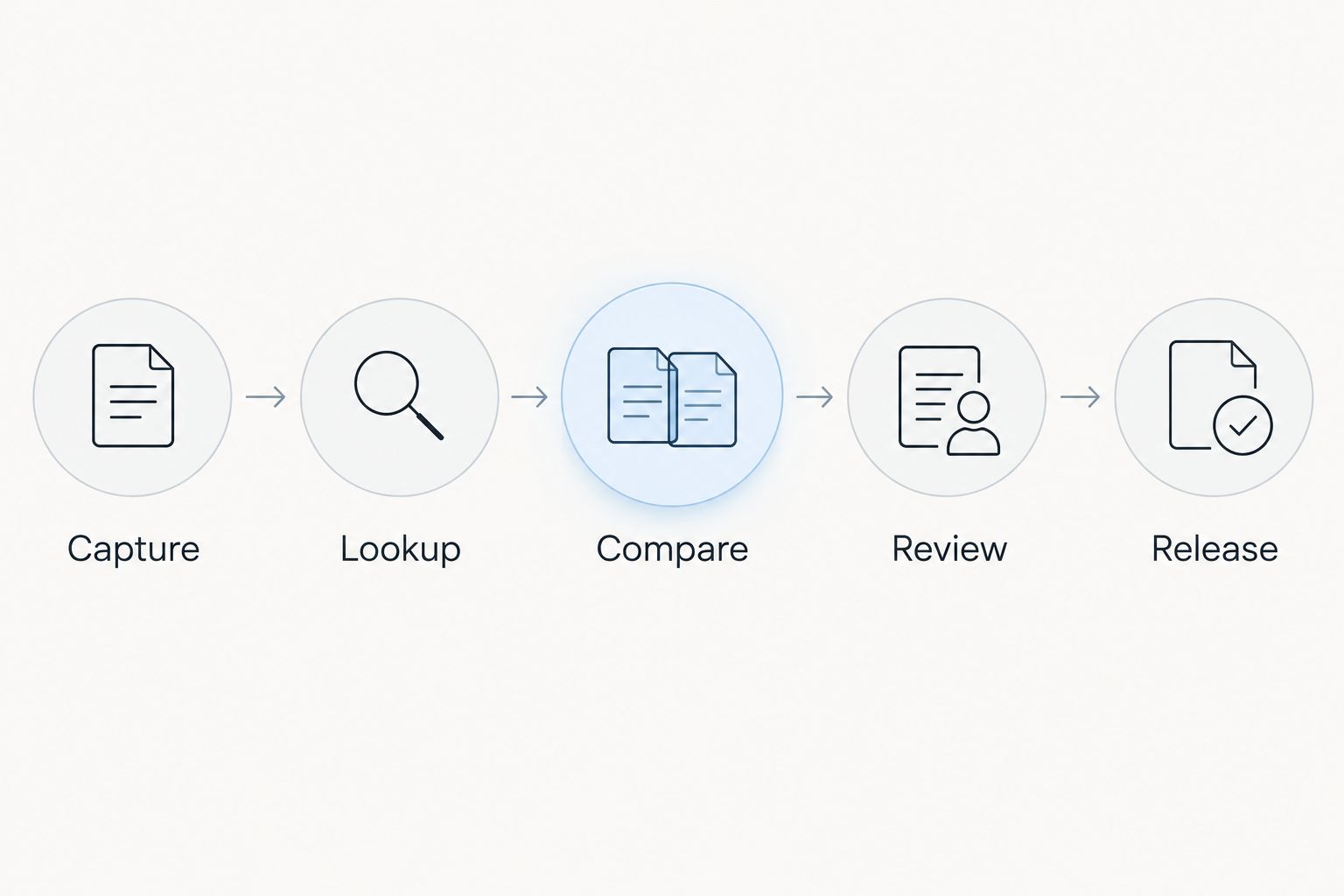
For your 2026 workflow acceptance check, run four test cases: an exact identity match, a different legal entity, an unavailable source, and a contract changed after approval. The first should proceed only with complete evidence; the other cases should remain blocked or return to review.
A failed lookup must never become a passed verification. Treat technical success, identity matching, and approval as separate conditions.
Recheck whenever contractor details change
A second workflow belongs beside the initial signing check: invalidate approval when identity-bearing information changes. This prevents a previous decision from silently covering a different agreement or contractor record.
- Watch Tax code supplied, Contract legal name, and Contract version for changes after verification. Include replacement of the underlying agreement file if your system can detect it.
- Change Verification status back to Pending and remove the signing release. Preserve the earlier evidence as history rather than overwriting it.
- Repeat the lookup and comparison against the updated agreement. Require a new decision tied to the new version.
- Record why the recheck occurred, such as a changed tax code or revised contracting entity. Keep the previous and current decisions distinguishable.
Expected result: editing an approved identity record cannot leave an outdated approval active.
Apply the same approach when a paused agreement returns for signature. Set your own evidence-freshness policy according to contractual risk and internal requirements; do not assume a universal validity period for every contractor.
If an onboarding decision made earlier in 2026 supports a later signing request, compare the underlying identity fields and check timestamp again. The calendar year alone is not evidence of freshness.
Troubleshooting
The lookup finds a company, but the name differs
Keep the request in Needs review. Compare the returned legal entity with the actual party in the agreement, not the trading name in an email signature. Ask the contractor for clarification and have the review owner document the resolution before releasing the agreement.
A spreadsheet changes the tax code
Set the identifier column to text before importing records and compare the imported value with the original document. Changing the cell format afterward does not restore characters already lost. Reimport the original value rather than reconstructing it from memory.
The source requires an interactive access check
Use the reviewer-assisted route. Do not bypass access controls or treat a blocked request as proof that the contractor does not exist. Leave the signing gate closed until an authorized reviewer records a result or resolves the exception.
A lookup error releases the signing request
Separate the error route from the verified route. Require an affirmative identity match, complete evidence, and the review decision together; a completed automation run is insufficient. Retest timeouts and empty responses before restoring the workflow.
A revised contract keeps its earlier approval
Make the contract version part of the verification record and recheck trigger. If your signing system cannot enforce a version-specific hold, use a controlled human release step and restrict who can send the document. Do not describe an unenforced reminder as automatic prevention.
Customize your workflow
Once identity verification works, connect its result to vendor onboarding and tender review. Keep each decision separate so a tax-code match does not become blanket supplier approval.
Dauthau contractor research can add procurement context to this process: your team can examine contractor data and bidding results alongside the identity evidence. The benefit is context for review; the limitation is that procurement research does not replace authoritative tax verification.
For a 2026 workflow register, document three things for every rule: its owner, its trigger, and its evidence requirement. That makes maintenance practical when your contract process or data source changes.
Expand the workflow with distinct tasks for signatory authority, payment-detail confirmation, and required contractual documents. Define what evidence closes each task instead of putting unrelated checks into one approval checkbox.
FAQ
How do I verify contractor tax code before signing?
Check the supplied tax code against an authoritative source, compare the returned legal entity with the agreement, and retain the evidence. Keep signing blocked until the identity check and any exceptions have an accepted review decision.
Can contractor tax-code verification be fully automatic?
Automated retrieval requires an authorized, documented connection to the verification source. Without that access, automate task assignment and the signing hold while a reviewer completes the lookup.
Does Dauthau replace an authoritative tax-registration check?
No. Dauthau provides bidding intelligence and contractor research context; use an authoritative tax-registration source for the tax-code check and retain its evidence.
What should happen when the contractor's legal name does not match?
Block signing and route the record for review. Preserve both names and resolve whether the difference concerns formatting, a trading name, or a different contracting entity.
Does a valid tax code prove the contractor can sign the agreement?
No. An identifier match does not establish signatory authority, contractual approval, payment details, or financial condition; those need separate checks.
Should I recheck a contractor already approved during onboarding?
Recheck when identity-bearing details or the contract version change, and apply your organization's evidence-freshness policy before signing. An earlier approval must remain distinguishable from the current decision.
What evidence should I keep from a contractor tax-code check?
Keep the supplied identifier, returned identity, source, check timestamp, reviewer, evidence reference, and contract version. Retain source material only as permitted by your access terms and records policy.
One last thing
Test whether someone can still send the agreement outside the normal approval route. A perfectly documented verification workflow does not prevent an unverified signature if another sending route stays open. Close that route or assign a controlled release owner before calling the process automatic.