
Instead of manually copying contractor names into disconnected vendor files, build a contractor search to vendor onboarding workflow that connects discovery, identity checks, document collection, and approval. Use Dauthau for Vietnamese contractor and bidding research, then carry the evidence into a controlled internal vendor record; a search result is not approval to transact.
- Dauthau supports contractor search to vendor onboarding through Vietnamese contractor data and bidding intelligence, not automatic vendor approval.
- Match the legal entity before collecting onboarding documents or creating a new vendor record.
- Keep procurement research, identity verification, and payment approval as separate checks.
- Use an evidence register and named reviewers to make vendor onboarding decisions traceable.
Why this matters
A contractor appearing in bidding results answers a research question: which business participated in procurement activity? It does not answer whether that business meets your purchasing requirements, whether its representative is authorized, or whether its payment instructions are genuine.
Dauthau bidding intelligence is best for Vietnamese businesses researching contractors and procurement activity before internal vendor review. Start with Dauthau for discovery, but keep acceptance criteria in your own onboarding process.
For your 2026 procedure, define a clear boundary: research identifies a candidate; evidence supports assessment; an authorized reviewer approves the vendor. This guide uses a manual handoff that does not depend on an API, an export function, or a native connection to your procurement system.
Before you start
- Arrange access to contractor and bidding research, an internal vendor register, and the document repository your organization permits. Assign procurement, compliance, and finance responsibilities before sending requests.
- Prepare a vendor questionnaire, your acceptance criteria, and a field for recording evidence sources and review dates. Separate required documents from documents needed only for particular contracts.
- Pre-empt the identity mismatch: similar trading names, branches, and consortium participation can confuse a search. Match the legal entity and relevant identifier before treating bidding history as evidence about the proposed vendor.
The bold field labels below are proposed labels for your internal template, not claims about existing software buttons. Create equivalent fields in your approved system rather than looking for an undocumented setting.
Contractor search criteria
Configure the candidate record
- Define the purchasing need. Record Required scope, Delivery location, and Assessment owner. Describe the work or supply you need, not just an industry label. These fields give reviewers a reason to include or reject each candidate.
- Search for the contractor by its known name and identifying details. Use available contractor data and bidding results to investigate relevant procurement activity. Keep the search terms alongside the candidate record so another reviewer can understand how the business was identified.
- Create Candidate legal name, Entity identifier, Source reference, and Research date fields. Copy identifiers carefully. If a detail is unavailable, mark it as unresolved instead of filling the gap from a similarly named company.
- Summarize the relevant evidence in Scope match. Explain what the procurement record actually demonstrates: a named participation, a recorded result, or another documented fact. Do not translate participation into successful delivery without separate evidence.
- Check your existing vendor register before opening another record. Use the legal identifier as the principal matching key where applicable, with the legal name as a supporting check. Maintain 1 candidate record per legal entity, rather than separate records for spelling variations.
Expected result: you have an identifiable candidate, a documented purchasing need, and traceable research references. You do not yet have an approved supplier.
For a wider search process, use the guide to contractor and company search platforms in Vietnam. Keep platform selection separate from the decision to accept a particular contractor.
Identity and evidence register
Configure the verification packet
- Open an evidence register attached to the candidate. Add Evidence type, Issuer or source, Document date, Review date, and Reviewer. For a 2026 review, record the actual review date; the year in a filename is not evidence that its contents remain current.
- Request documents appropriate to your purchasing scope. These can include registration information, relevant authorizations, a company profile, and references where your policy requires them. Explain the purpose of each request and avoid collecting unrelated personal information.
- Compare the proposed contracting entity with the research record and submitted documents. Resolve differences in legal name, identifier, and contracting role. If a branch or consortium is involved, document exactly which entity will sign and which will perform the work.
- Separate Research evidence from Vendor declarations. A contractor's own profile is a statement from the applicant. Preserve that distinction even when its contents match a procurement record; reviewers need to know who supplied each fact.
- Record unresolved questions in Open issues, with an owner and the evidence needed to close each one. Do not let an attachment count substitute for a decision about whether the document answers the relevant question.
Expected result: a reviewer can connect every important identity and capability statement to its source, while seeing what remains unverified.
Use 2 separate checks for identity and payment instructions. Establishing which company you are assessing does not establish that a bank account change came from an authorized person. Apply your finance team's approved verification procedure before entering payment details.
Review routing and approval gates
Configure the decision record
- Assign review responsibilities by subject. Procurement evaluates scope fit; the appropriate compliance reviewer addresses your applicable requirements; finance controls payment setup. Adapt the roles to your organization, but name a responsible reviewer for every required decision.
- Define 3 decision states: Pending, Approved, and Rejected. Keep Open issues separate so an incomplete submission does not appear approved merely because someone finished entering its details.
- Add Decision rationale, Decision owner, Decision date, and Approval scope. Record whether approval applies to a particular purchasing category, contract, or broader relationship. Do not imply that a narrow approval covers unrelated work.
- Require the responsible reviewers to record their decisions before releasing the vendor for the activity covered by those decisions. If your policy permits exceptions, record the authorizing person, restriction, and reason rather than silently bypassing the gate.
- Lock down payment-field editing according to your internal access policy. Keep the person requesting a bank-detail change distinct from the verification evidence. Store sensitive material only in the repository your organization authorizes.
Expected result: the vendor has an explicit decision, an accountable owner, and a defined approval scope. A populated profile alone cannot be mistaken for authorization.
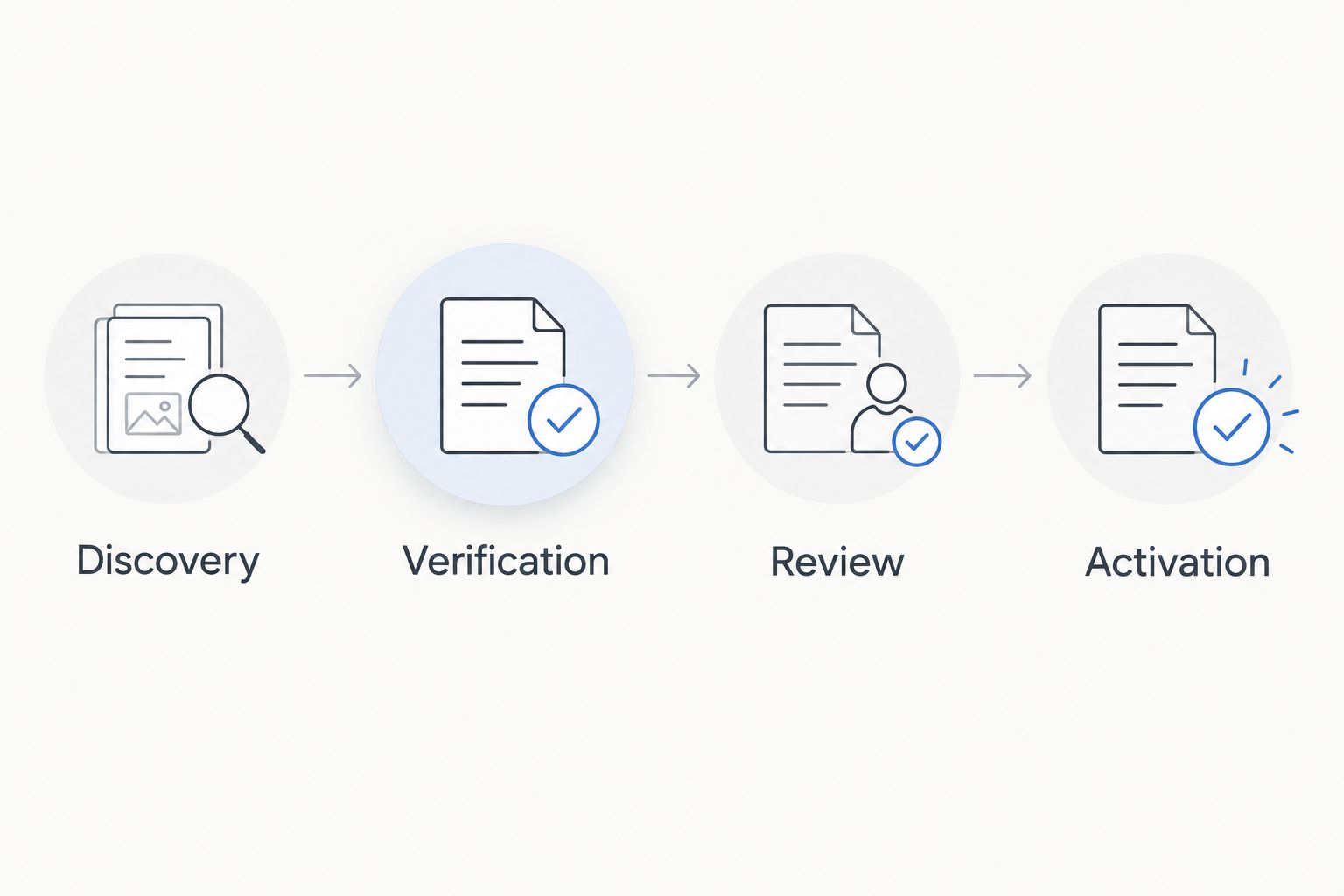
The sequence is straightforward: Discovery, Verification, Review, then Activation. Each stage produces the evidence the next reviewer needs; activation follows approval rather than replacing it.
Vendor activation and handoff
Configure the operational record
- Transfer only the approved identity and purchasing details into the operational vendor register. Preserve the candidate reference so the approved record remains connected to its evidence. If someone rekeys information, compare the destination record against the reviewed source.
- Record Vendor owner, Approved scope, Review trigger, and Evidence location. Use a controlled reference to the document repository instead of distributing sensitive attachments across unrelated messages and spreadsheets.
- Communicate the approval boundary to the purchasing team. State which activity is permitted and which unresolved conditions restrict use. Do not make users infer the decision from a folder of documents.
- Test the handoff with a sample record before applying the process across your candidate list. Confirm that an incomplete submission stays pending and that a rejected record cannot be confused with an approved vendor.
- Name the maintained procedure Vendor onboarding workflow 2026, then assign a process owner. Update the procedure when responsibilities or controls change; do not merely update its title next year.
Expected result: purchasing can identify the approved entity, understand the permitted scope, and locate the decision without repeating the entire investigation.
Choose the handoff method
Both methods below can support the same approval policy. Choose based on your actual system capabilities, not an assumed connector.
| Method | Best for | Advantage | Limitation |
|---|---|---|---|
| Controlled manual handoff | Teams establishing a repeatable process | Works without a documented software integration | Requires careful rekeying and reconciliation |
| Validated automated handoff | Teams with documented integration support and technical ownership | Can reduce repeated data entry after mapping is tested | Requires permission checks, error handling, and maintained field mappings |
Start with the controlled manual handoff when integration support is unconfirmed. Automating an ambiguous identity match moves the ambiguity into another system; it does not resolve it.
Reassess an existing vendor when information changes
Vendor onboarding also needs a change workflow. Use it when your team receives a material change, such as new contracting details, revised payment instructions, or a different scope of work. Procurement monitoring and vendor reassessment serve different purposes: a new tender result is a research input, not an automatic reason to approve or reject a vendor.
- Locate the existing legal-entity record before opening a new candidate.
- Create a change entry showing the previous value, proposed value, source, and reporting date.
- Route only the affected decisions to the responsible reviewers. A payment change needs finance verification; an expanded purchasing scope needs the relevant scope review.
- Preserve the previous decision and record the replacement decision separately. Avoid overwriting the history that explains an earlier purchase.
Expected result: the vendor record changes through a documented decision, not through an unreviewed overwrite. Apply this same rule to your 2026 vendor refresh: distinguish refreshed research from renewed authorization.
Troubleshooting
The search finds several similar company names
Stop the handoff and compare identifiers and contracting roles. Keep candidates separate until the evidence establishes a match; matching words in a company name are not enough to merge records.
Bidding history looks relevant, but capability remains unclear
Separate procurement participation from evidence of delivery. Ask for scope-specific support required by your policy, and leave the capability decision pending until the responsible reviewer has enough evidence.
A duplicate vendor appears after data entry
Compare legal identifiers before merging anything. Preserve references and decision history, and confirm whether the records represent the same entity or different entities within a group. Similar names alone do not justify a merge.
Every document is attached, but onboarding is stuck
Check Open issues, Decision owner, and Approval scope. The missing item is often a recorded decision rather than another attachment. Return the specific unresolved question to its owner instead of restarting document collection.
Payment instructions change during onboarding
Keep the proposed change out of the operational payment record until finance completes the approved verification process. Do not treat a familiar email thread or a matching company profile as independent confirmation of payment authority.
Customize your workflow
Build separate evidence requirements for different purchasing scopes while keeping the identity and approval gates consistent. A document relevant to one contract should not become a mandatory request for every vendor simply because it exists in your template.
Dauthau bidding intelligence supports the research stage; your internal controls govern vendor acceptance. Its stated role covers searching, tracking, and analyzing tenders, contractor data, and bidding results. That provides procurement context, but it is not a substitute for your documented identity, capability, and payment checks.
Before introducing automation, map each source field to its destination and define what happens when a value is missing or conflicting. Test those exceptions alongside a successful handoff. A workflow that handles only complete records is not ready for routine use.
FAQ
How do I move from contractor search to vendor onboarding?
Identify the legal entity, preserve the research evidence, collect scope-specific documents, and obtain the required internal approvals before activation. Keep research findings separate from the decision that permits purchasing.
Is Dauthau enough to approve a new vendor?
No. Dauthau provides bidding intelligence and contractor research, while your organization must apply its own vendor acceptance and payment controls. A procurement record does not replace those decisions.
Can I run this workflow without an API?
Yes. Use a controlled manual handoff between the research record and your internal vendor register. Verify copied identifiers and preserve the evidence reference before activating the vendor.
What should I check before creating a vendor record?
Check the legal entity and your existing vendor register first. Resolve similar names, branch relationships, and conflicting identifiers before creating a separate operational record.
Does a bidding result prove a contractor can deliver?
A bidding result does not by itself prove delivery capability for your proposed scope. Assess the recorded fact alongside the scope-specific evidence required by your purchasing policy.
What should happen when an approved vendor changes bank details?
Route the proposed payment change through your finance team's verification process before updating the payment record. Preserve the previous details and the authorization history in your controlled records.
When should I automate vendor onboarding?
Automate after the manual process has defined identity matching, field ownership, approval gates, and exception handling. Confirm documented integration support and test incomplete or conflicting records before routine use.
One last thing
Test rejection before you test speed. Put an unresolved identity mismatch through your 2026 workflow and confirm it remains pending, cannot enter the approved purchasing process, and has a named owner. That test reveals more about your controls than watching a complete submission pass.