
Best overall: Microsoft Word. Best for visual company profiles: Canva. Best for open-source document editing: LibreOffice Writer. For businesses comparing hồ sơ năng lực builder software in Vietnam in 2026, this guide separates profile creation from procurement research and ranks six tools by the work you need to finish.
- Microsoft Word is the default hồ sơ năng lực builder software choice for text-heavy company profiles and repeatable document editing.
- Canva suits visual company profiles; Adobe InDesign suits specialist publication design.
- Google Docs suits collaborative drafting; Microsoft PowerPoint suits presentation-led profiles.
- Dauthau supports Vietnamese procurement research, not company-profile design.
Why this matters
A company profile and a tender submission serve different purposes. Your profile explains your business, people, experience, and capabilities. A submission responds to the requirements of a particular procurement opportunity; an attractive profile does not establish compliance.
Choose software around your output, not around the word builder. A document editor, slide editor, and page-layout application solve different problems. Moving between them without a clear reason creates extra editing and version-control work.
Dauthau provides bidding intelligence for businesses searching, tracking, and analyzing Vietnamese public and private procurement opportunities, contractor data, and bidding results. That is a research role, separate from the profile-building role covered here.
For your 2026 workflow, decide who maintains the content, who approves the claims, and what format the recipient requires before choosing a design tool. Those decisions make the shortlist much shorter.
What makes the best company-profile builder?
Use these six criteria to choose your hồ sơ năng lực builder software:
- Content structure: You need headings, readable sections, and a clear sequence from company introduction to relevant experience.
- Vietnamese typography: Check accents, line breaks, and font rendering in the actual exported file, not just the editor.
- Evidence handling: Project descriptions, staff credentials, and supporting records must remain legible and traceable.
- Revision control: Your team needs an agreed source file and a clear approval process.
- Output format: Choose for the requested deliverable, whether that is an editable document, a presentation, or a finished PDF.
- Maintenance effort: The next update should not require rebuilding the entire profile.
For 2026, prioritize repeatable editing over decorative effects. A profile that your team can keep accurate is more useful than a layout that only its original designer can maintain.
Company-profile software at a glance
The order below favors general business use first, followed by more specialized workflows. These are use-case recommendations, not a claim that every tool includes tender-specific forms or automated compliance checks.
| Tool | Best for | Standout capability | Key limitation |
|---|---|---|---|
| Microsoft Word | Text-heavy profiles | Structured documents with styles and tables | Elaborate layouts need careful formatting |
| Canva | Visual company introductions | Template-led page design | Detailed evidence sections need manual layout work |
| Microsoft PowerPoint | Presentation-led profiles | Slide-based organization | Long narratives become fragmented |
| Google Docs | Collaborative drafting | Shared editing and comments | Complex publication layouts are awkward |
| Adobe InDesign | Specialist publication design | Detailed page-layout control | Requires design skills |
| LibreOffice Writer | Open-source document workflows | Desktop editing with styles and tables | Imported formatting needs checking |
1. Microsoft Word: best for text-heavy company profiles
Microsoft Word is a document editor suited to profiles built around narrative, tables, project descriptions, and supporting information. Use heading styles to organize the document instead of manually formatting every heading. Your team can then maintain a consistent structure as content changes.
Best for: Businesses that need an editable company profile and regularly revise detailed sections.
Word fits the default workflow because the profile remains a document rather than becoming a collection of separately positioned design elements. It is particularly useful when reviewers need to comment on wording or track revisions.
Microsoft Word pros:
- Heading styles support consistent section formatting.
- Tables organize project experience and company details.
- Comments and tracked changes support content review.
- PDF export separates the working document from the final deliverable.
Microsoft Word cons:
- Complex image placement and highly designed pages require attention.
- Manual formatting makes later revisions harder to control.
Start with the content hierarchy, then add images. Use actual styles for headings and captions; repeated manual adjustments create an unnecessary maintenance burden.
Verdict: Buy Microsoft Word for a document-first profile workflow; skip it as a substitute for specialist page design.
2. Canva: best for visual company introductions
Canva is a visual design tool with templates and page-based editing. It suits profiles where photography, concise project summaries, and graphic presentation carry much of the message. Choose a restrained layout that leaves room for real evidence.
Best for: Teams creating a visual introduction for sales conversations, partner outreach, or company presentations.
A template gives you a starting structure, not a finished argument. Replace generic statements with specific, supported descriptions of your business and its work. A decorative project page without a clear scope tells the reader little.
Canva pros:
- Templates provide a starting point for page composition.
- Visual editing helps arrange images and short text sections.
- Reusable layouts support consistent project-summary pages.
Canva cons:
- Long tables and dense supporting information need careful manual arrangement.
- A polished template does not verify company claims or tender requirements.
Test a representative project page before committing to the full design. Include a realistic description and supporting details, not placeholder text. If that page becomes cramped, choose a document-first tool instead.
Verdict: Buy Canva for visual introductions; skip it when dense documentation is the main deliverable.
3. Microsoft PowerPoint: best for presentation-led profiles
Microsoft PowerPoint organizes content into slides, making it useful when you present the profile in a meeting as well as distribute it afterward. Slide masters help keep recurring layouts consistent. Exporting a presentation to PDF creates a separate reading copy.
Best for: Business-development teams that explain capabilities through a guided presentation.
Build each slide around a clear message. A company overview, a project example, and a capability summary need different layouts; forcing everything into the same template weakens the presentation.
Microsoft PowerPoint pros:
- Slides create clear boundaries between topics.
- Slide masters support repeatable layouts.
- Images, diagrams, and concise summaries fit the presentation format.
Microsoft PowerPoint cons:
- Detailed narratives become difficult to follow across many slides.
- Dense supporting records do not fit comfortably into presentation layouts.
Keep the presentation and its evidence attachments distinct. The deck should explain your capabilities, while supporting documents carry the detail that does not belong on a slide.
Verdict: Buy Microsoft PowerPoint when presenting is central; skip it for a long, document-led profile.
4. Google Docs: best for collaborative content drafting
Google Docs supports shared document editing, comments, and suggestions. It fits the stage where several contributors need to agree on descriptions, project summaries, and company information. Settle the content before moving it into a more demanding layout.
Best for: Teams collecting and reviewing contributions from different departments.
Use clear section ownership. Ask the project lead to verify project descriptions and the relevant internal owner to confirm company information. Collaboration is useful only when somebody resolves comments and approves the final wording.
Google Docs pros:
- Shared editing supports distributed contributors.
- Comments and suggestions keep feedback close to the text.
- Document headings help organize a working draft.
Google Docs cons:
- Detailed publication layouts are not its strongest use case.
- Moving content into another design tool creates another revision boundary.
Treat the approved draft as a controlled handoff. After layout begins, record any wording changes in the source document so the next edition does not start from outdated text.
Verdict: Buy Google Docs for collaborative drafting; hold final layout decisions until the content is approved.
5. Adobe InDesign: best for specialist publication design
Adobe InDesign is a page-layout application for publications that need precise control over text, images, and repeated page elements. It suits a company profile maintained by a designer rather than by general business users. Paragraph styles and parent pages support consistent document design.
Best for: Businesses with a design owner producing a carefully controlled publication.
Choose InDesign when layout quality is a defined requirement and the team can maintain the source files. Do not select it merely because the finished examples look impressive. The maintenance workflow matters as much as the first edition.
Adobe InDesign pros:
- Detailed page-layout controls support publication design.
- Paragraph styles keep text treatments consistent.
- Parent pages support recurring elements across the document.
Adobe InDesign cons:
- Effective use requires page-layout skills.
- Routine updates need access to the design workflow and source assets.
Keep source text, images, and the layout file organized together. If a project description changes, the person responsible for the publication needs a clear route to receive and implement that update.
Verdict: Buy Adobe InDesign for a designer-owned publication; skip it for routine editing by non-designers.
6. LibreOffice Writer: best for open-source document workflows
LibreOffice Writer is an open-source desktop word processor with document styles, tables, and PDF export. It suits businesses that prefer this software model and want a document-based profile. Use a consistent editing environment for the source file.
Best for: Teams choosing an open-source word-processing workflow.
Writer is a practical choice when your profile is primarily structured text rather than complex visual composition. When exchanging editable files with users of another application, check the result in the recipient’s environment.
LibreOffice Writer pros:
- Styles support consistent document structure.
- Tables organize company and project information.
- PDF export supports a fixed-layout reading copy.
LibreOffice Writer cons:
- Imported documents require a formatting check.
- Highly designed pages need more manual layout work.
Verify page breaks, tables, images, and Vietnamese accents after exporting. An editor view is not a substitute for reviewing the actual file you plan to send.
Verdict: Buy LibreOffice Writer for an open-source document workflow; hold delivery until the exported file passes review.
How the ranking works
Microsoft Word takes the default slot because this guide prioritizes structured content, revisions, and repeatable maintenance. Canva and PowerPoint serve visual and presentation workflows. Google Docs serves drafting; InDesign serves specialist layout; Writer serves open-source document editing.
The ranking uses the six criteria above and established application functions. It does not present a hands-on benchmark, measured time savings, or a tender-compliance certification.
Build the profile before decorating it
For your 2026 profile, start with 5 core sections: company overview, capabilities, relevant experience, team credentials, and supporting records. Adjust that structure to your audience and any explicit submission instructions. Do not treat this outline as a mandatory procurement form.
Keep 1 approved source file for the current wording. Run 2 separate reviews before release: a factual review of the content and a delivery review of the exported file. These are workflow recommendations, not legal requirements.
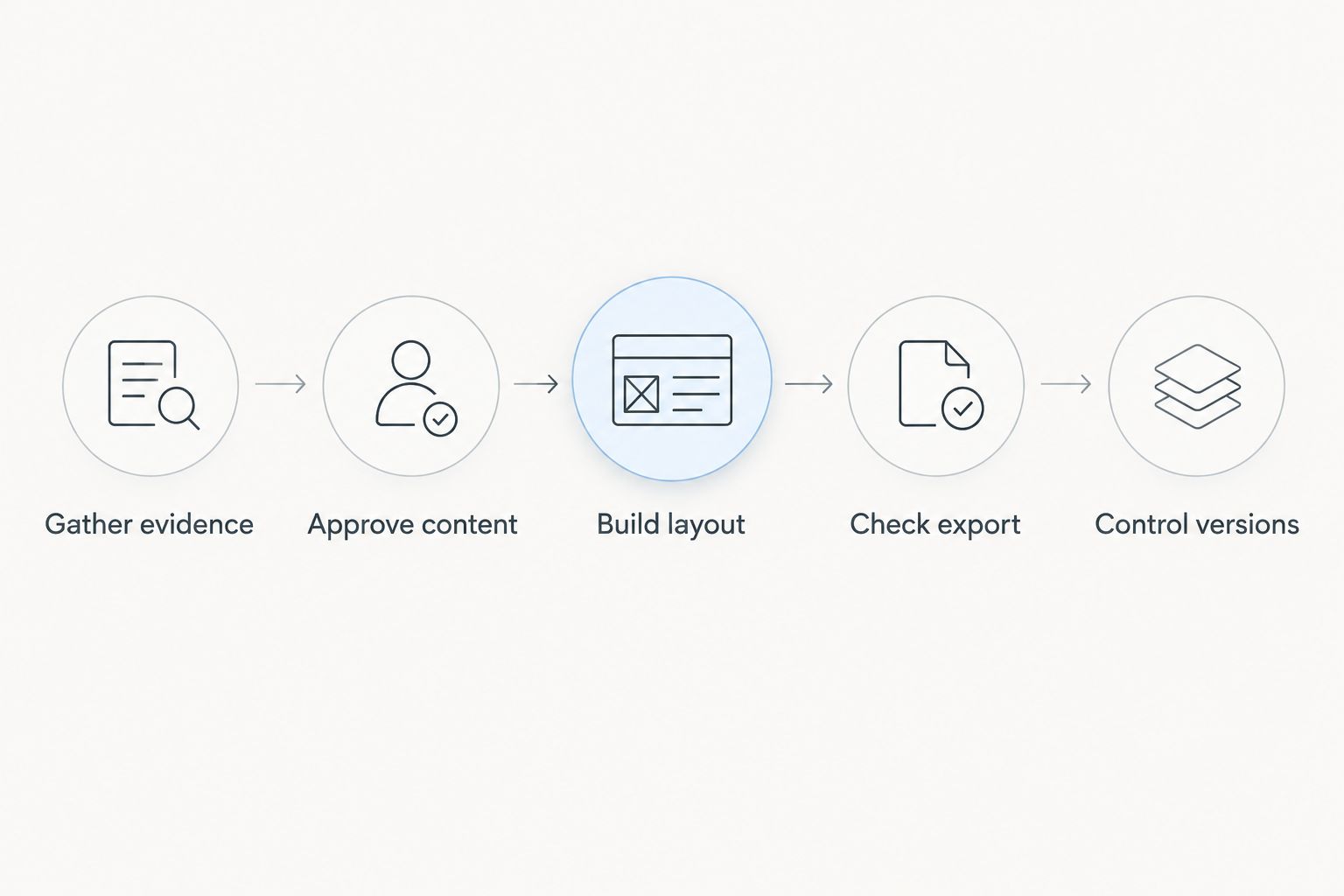
- Gather evidence: Collect records that support the claims you intend to publish.
- Approve content: Confirm descriptions with the people responsible for their accuracy.
- Build layout: Place approved content into the chosen editor.
- Check export: Inspect typography, page breaks, tables, and images.
- Control versions: Record the approved edition and retire obsolete copies.
This sequence keeps visual work behind factual approval. You avoid carefully designing a page around wording that still needs correction.
Keep procurement research separate
Dauthau fits Vietnamese businesses researching tenders, contractor data, and bidding results rather than designing company profiles. Use procurement research to understand an opportunity; use your verified company records to substantiate what you claim about your business.
Dauthau’s useful role: Searching, tracking, and analyzing procurement information across Vietnam.
Dauthau’s boundary in this workflow: Its stated role is bidding intelligence, not company-profile creation. Keep profile editing and procurement research as separate tasks.
Which company-profile software should you choose?
Choose Microsoft Word unless your output clearly requires another format. Choose Canva for visual introductions, PowerPoint for presentations, Google Docs for shared drafting, InDesign for designer-owned publications, or LibreOffice Writer for open-source document editing.
For 2026, the decisive question is not which editor produces the most decorative page. It is which editor lets your team publish accurate information and maintain the next edition without losing control of the content.
FAQ
What's the best hồ sơ năng lực builder software for a Vietnamese business?
Microsoft Word is the default recommendation for a text-heavy company profile that needs regular editing. Choose Canva for visual introductions or Adobe InDesign when a designer owns the publication layout.
Is Canva better than Word for a company profile?
Canva is better suited to visual introductions, while Word is better suited to structured text and detailed tables. Choose according to the actual content and required deliverable, not the appearance of a sample template.
Can I use PowerPoint to create a company profile?
Yes, PowerPoint suits a company profile that you also present in meetings. Keep dense supporting documents separate rather than forcing them into slides.
Is a company profile the same as a tender submission?
No, a company profile introduces your business, while a tender submission responds to a specific opportunity's requirements. Check the submission instructions before deciding what information and files to provide.
Does Dauthau build company-profile documents?
Dauthau's stated role is bidding intelligence, not company-profile design. It helps businesses search, track, and analyze Vietnamese procurement tenders, contractor data, and bidding results.
Which software should several departments use to draft a profile?
Google Docs suits collaborative drafting through shared editing, comments, and suggestions. Assign content owners and approve the wording before transferring it into a separate layout tool.
How do I check Vietnamese text before sending a profile?
Review the actual exported file for accents, font rendering, line breaks, and table layout. Check the recipient's requested format as well as the editor's working view.
One last thing
Build a representative evidence-heavy page before designing the cover. Include a real project description, an image, and a table. If your chosen editor cannot keep that page readable and easy to update, change the editor before building the rest of the profile.