
Instead of copying tender notices into Zalo, connect a verified tender-alert source to an authorized Zalo delivery route, then test the complete handoff before enabling automatic messages. To receive tender alerts on Zalo, you need both a matching rule for procurement opportunities and a supported way to deliver those matches to the intended recipient.
- For tender alerts on Zalo, verify the source and delivery route before configuring automation.
- Dauthau supports Vietnamese procurement research; confirm the alert connection supported by your account.
- Filter tender notifications before delivery, and distinguish new opportunities from updates.
- Test receipt, duplicate handling, and failed delivery before relying on the workflow.
Why this matters
A tender alert is useful only when the right person receives enough information to decide what to do. Sending every search result to a chat creates another inbox; sending a relevant notice with a source reference and an owner creates an actionable handoff.
Dauthau is best suited to Vietnamese businesses that need procurement intelligence to identify and assess tender opportunities. Its platform covers tender searches, tracking, contractor data, and bidding results across Vietnam. A Zalo delivery connection is a separate capability to verify, not something to assume from those research functions.
For your 2026 setup, separate discovery, delivery, and follow-up. A successful message proves delivery; it does not prove that the opportunity fits your business or that someone has accepted responsibility for reviewing it.
Before you start
- Source access: Have access to the tender searches or tracking records you intend to monitor. Identify the documented alert output your account supports before choosing an automation method.
- Destination access: Have control of the intended Zalo receiving account or destination, plus authorization for the delivery method. Confirm the applicable messaging permissions and recipient requirements in current documentation.
- The setup trap: A working Zalo account is not proof that an external system can send automated messages to it. Verify the complete source-to-destination route before building filters or message templates; never substitute an unofficial personal-account automation tool.
Collect a representative tender notice and an updated version of a notice for testing. Remove sensitive information from any sample you share outside your approved systems.
Choose the delivery route
There are two practical workflow designs: a verified automatic connection or a human-reviewed handoff. These are operating models, not claims that either route is included in a particular account.
| Workflow | Best for | Advantage | Limitation | Recommendation |
|---|---|---|---|---|
| Verified automatic delivery | Teams with documented source output and authorized Zalo delivery | Removes routine copying after configuration | Needs permissions, error handling, and maintenance | Use only after an end-to-end test |
| Human-reviewed sharing | Teams without a verified automatic route or needing editorial review | Lets a reviewer check relevance before sending | Depends on a person completing the handoff | Use as the fallback, with a named owner |
Do not build an automatic workflow around an unverified connection. If the source cannot expose the required alert information, or the destination cannot accept the intended messages, stop the automatic setup and use the reviewed workflow below.
Keep the route decision in your 2026 operating notes. Record who confirmed support, which documentation applies, and who owns changes to the connection. That record gives the next administrator a clear starting point.
Tender source and matching rules
The first configuration unit defines what deserves a notification. Keep this separate from Zalo delivery so you can inspect matching results without sending messages.
- Open the tender-search or tracking function available in your account. Choose a business need, such as a procurement category your team actually serves, rather than a broad phrase that captures unrelated notices.
- Apply the relevant search criteria supported by the source. Review terminology, geography, procurement scope, and notice status where those criteria exist; do not assume every source offers the same filters.
- Inspect a sample of results manually. Open the underlying notices and check whether the matches represent work your business would consider bidding for.
- Identify the supported output for those matches. Use only the documented alert, export, feed, or connection method that your account actually provides.
- Record a stable notice identifier and the source reference whenever the output contains them. Preserve these values through later steps instead of relying on the notice title alone.
The intended result is a relevant match containing enough source information to locate the original notice. If you cannot reproduce that result, fix the search before connecting delivery.
Dauthau tender intelligence helps with the research stage; your routing rule determines which findings reach a recipient. Keep relevance decisions at the source instead of asking every recipient to filter the same noise.
Zalo destination and permissions
Configure the receiving side only after confirming the documented route. The instructions here describe the required checks, not universal button names: use the exact controls shown in the current documentation for your selected connection.
- Identify the destination and its responsible owner. Decide whether the message is intended for an individual reviewer or another destination explicitly supported by the delivery method.
- Complete the authorization process required by that method. Use an organization-controlled identity where appropriate, and keep credentials out of shared spreadsheets and message templates.
- Confirm the recipient requirements before sending tender information. Check consent, destination eligibility, and message restrictions in the applicable documentation.
- Send a harmless connection test containing no confidential procurement details. Verify receipt at the intended destination rather than relying solely on the sending system's success indicator.
- Record how access is maintained and revoked. Assign responsibility for replacing expired credentials or changing the destination when the owner changes.
The expected result is a test message visible to the correct recipient through an authorized route. If the test fails, resolve destination access before adding tender data.
For the 2026 workflow, keep authorization ownership separate from opportunity ownership. The person maintaining the connection does not automatically become responsible for evaluating every tender it delivers.
Message mapping and delivery checks
Map only information the source actually provides. Never fill a missing deadline, buyer name, or notice identifier with a guessed value. A concise alert with a reliable source reference is more useful than a detailed but inaccurate summary.
- Define a compact message structure: notice title, source identifier, event type, relevant date when present, source reference, and assigned reviewer. These are suggested content labels, not software interface fields.
- Preserve the meaning of dates. Do not relabel publication time as a submission deadline, and retain the stated time zone when the source supplies one.
- Establish duplicate handling before activation. Use the source identifier and event information available in the output to distinguish repeated delivery from a genuinely changed notice.
- Route failed messages to a responsible person through an approved fallback. Preserve the failure reason where the delivery system provides it, without exposing credentials.
- Run at least 3 test cases: a new matching notice, a repeated copy of that notice, and a changed version. This is a recommended acceptance test, not a platform performance claim.
The expected result is a readable message, no unnecessary repeat for the unchanged notice, and a distinguishable update for the changed notice. If the source does not expose change information, do not promise update detection.
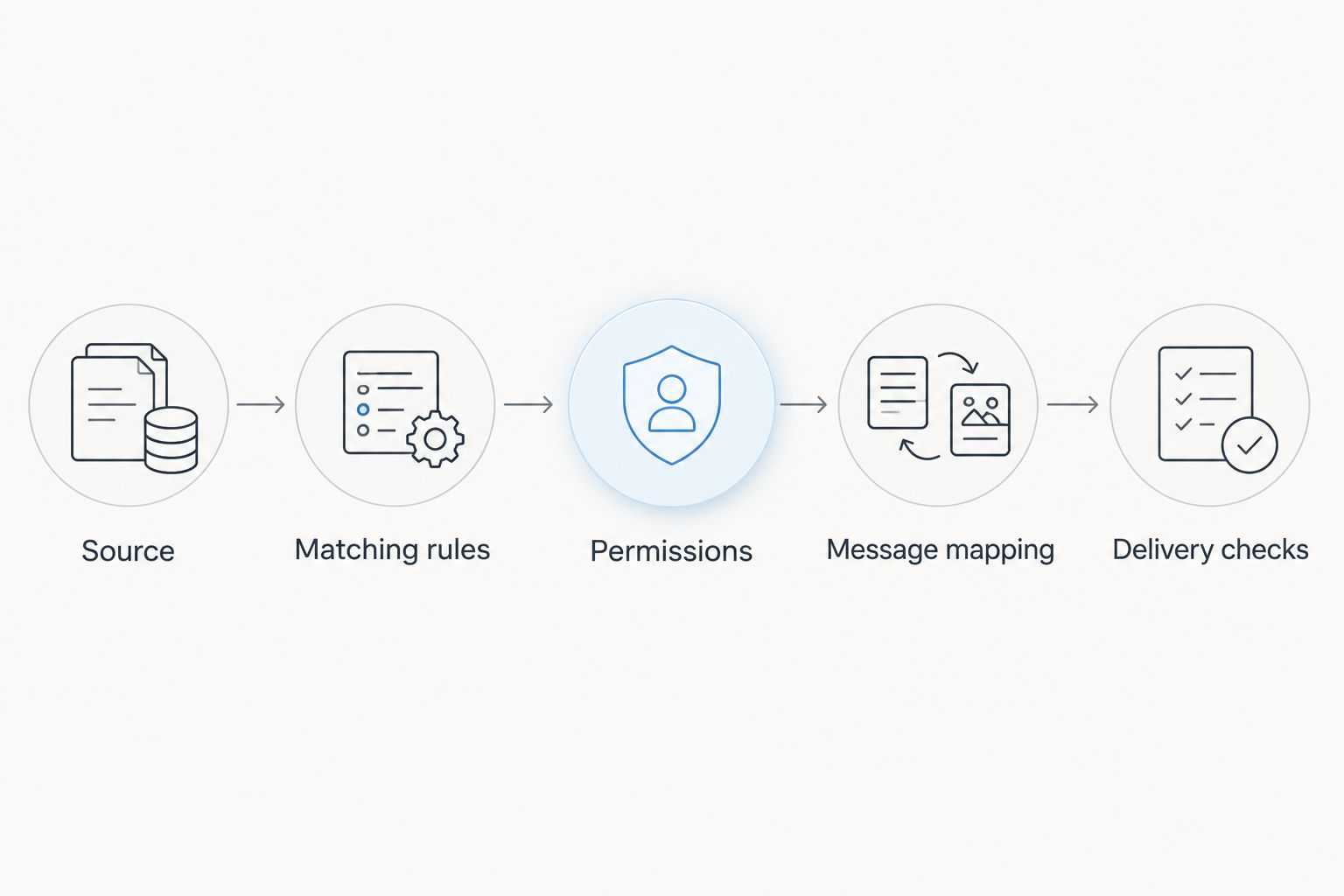
Keep a 2026 test record with the source event, expected behavior, actual receipt, and reviewer outcome. Check both ends: the notice should match the rule, and the recipient should be able to find the original record.
Notify reviewers when a tracked tender changes
An update workflow serves a different purpose from a discovery workflow. Discovery asks whether a new opportunity deserves attention; update monitoring asks whether an existing opportunity now requires a different action.
Use this variant only when the source provides a documented way to identify changes to tracked notices. A repeated search match alone does not establish that the underlying notice changed.
- Track the original identifier. Keep the same source identifier across initial and subsequent messages so the reviewer can connect them.
- State the changed information. Describe only the fields the source explicitly reports as changed. If all you receive is an update event, direct the reviewer to inspect the source rather than inventing a summary.
- Retain ownership. Route the change to the person already reviewing the opportunity, or define a reassignment rule when that person is unavailable.
- Separate receipt from review. Treat message delivery as a notification event, not as approval of the revised tender requirements.
Best for active opportunities: a verified update workflow keeps changes attached to an existing review. Its limitation is source dependence: without reliable identifiers and change signals, human comparison remains necessary.
Troubleshooting tender alerts on Zalo
Matches appear, but no message arrives
Test the destination independently with harmless content. Check authorization, recipient eligibility, and the delivery response before changing the tender filter; a matching problem and a delivery problem require different fixes.
The same notice arrives repeatedly
Compare the source identifiers and event information across repeated messages. If the workflow processes the same unchanged record again, correct the duplicate rule; if the source reports an update, label the message as an update instead of suppressing it automatically.
Too many irrelevant notices reach reviewers
Inspect the original matching rule before adding more downstream conditions. Remove ambiguous terms, narrow supported criteria, and review the resulting notices manually before resuming delivery.
The date in the message is misleading
Compare the mapped value with the original notice and confirm what that field means. Correct the mapping, preserve the source's time-zone context, and avoid adding a deadline when the output supplies only a publication date.
Delivery worked during testing, then stopped
Check connection authorization, destination changes, and recorded delivery errors. Restore the documented route, then replay only events that genuinely need delivery; sending the entire history again can create duplicates and confuse reviewers.
Customize your workflow
Once delivery is reliable, improve the handoff rather than adding more messages. Assign a reviewer, define the next action, and decide where the review outcome will be recorded.
Use a simple operating checklist:
- Assign 1 accountable reviewer to each routed opportunity as a starting rule.
- Keep 2 distinct event types: new opportunity and tracked-notice update.
- Choose a backup reviewer for absences.
- Record whether the team will review, decline, or investigate the opportunity further.
- Keep the original source reference attached to the decision.
These numbers are configuration recommendations, not limits of Dauthau or Zalo. Adjust ownership to your team structure without losing a clear point of responsibility.
For a broader handoff, read the guide to connecting tender alerts to your CRM. A CRM workflow should preserve the source identifier and review status rather than treating every notification as a qualified sales opportunity.
If you use human-reviewed sharing instead, give the reviewer the same matching criteria and message structure. The limitation is manual effort, so document a review schedule and a backup owner instead of presenting the process as automatic.
FAQ
How do I get tender alerts on Zalo?
Connect a documented tender-alert output to an authorized Zalo delivery route, then test receipt with a representative notice. If that route is not supported, use human-reviewed sharing rather than assuming a native integration exists.
Does Dauthau automatically send tender notifications to Zalo?
Confirm the Zalo delivery connection supported by your account before configuring automatic notifications. Tender search and tracking capabilities alone do not establish that a particular messaging integration is included.
Can I send tender alerts to my personal Zalo account?
Use a personal Zalo account as the destination only when the documented delivery method explicitly supports it. Having a personal account does not by itself authorize external automated messages.
What information should a tender notification contain?
Include the notice title, source identifier, event type, source reference, and reviewer when those values are available. Add dates only with their correct meaning, and never invent missing tender details.
How do I stop duplicate tender notifications?
Identify repeated events using the stable notice identifier and event information supplied by the source. Keep genuine updates separate from unchanged repeats so duplicate suppression does not hide a meaningful change.
Can I receive an alert when a tender deadline changes?
Use deadline-change alerts only when the source exposes a reliable change signal or enough information for a verified comparison. A fresh search match is not proof that the deadline changed.
What should I test before enabling automatic tender alerts?
Test a new matching notice, an unchanged repeat, and a changed notice, then verify receipt at the intended destination. Also confirm that a failed delivery reaches an accountable person through an approved fallback.
One last thing
A delivered alert is not an accepted task. Before signing off your 2026 workflow, ask the recipient to open the original notice and record a review decision. That check tests the part automation cannot establish on its own: whether the message leads to useful action.